Author: vidak

  • Word Processors in BASIC, Part 1

    Word Processors in BASIC, Part 1

    Quickwriter

    Found in June 1988 issue of Nibble magazine (Volume 9, Number 6).

    Archive.org link here.

    The project was alerted to the existence of a few text editors and word processors in Nibble magazine by someone on matrix.

    What we found was a great wealth of BASIC programs for the Apple II computer. We uncovered several particularly interesting BASIC word processors. Two that are of particular interest are Quickwriter and Nibblewriter.

    Both programs are quite long and involved, so instead of creating one enormous post, we decided to split the discussion up into two feature posts.

    diskM8 File Dump

    Please find an ASCII conversion of the BASIC dump obtained using the following commands:

    $ diskm8 -ingest /path/to/your/disk/images
    $ diskm8 -search "quickwriter"
    $ diskm8 -with-disk "your_disk_image.do" -file-extract "QUICKWRITER.BAS"

    Code Listing

    10  REM **********************
    20  REM *     TYPEWRITER     *
    30  REM *  BY JAMES D EVANS  *
    40  REM * COPYRIGHT (C) 1988 *
    50  REM * BY MICROSPARC, INC *
    60  REM * CONCORD, MA  01742 *
    70  REM **********************
    80  HIMEM: 38144:X =  FRE (0)
    90  ONERR  GOTO 2740
    100  GOSUB 2220
    110  GOTO 230
    120  REM **WARMSTART 80-COL CARD**
    130  ON  NOT PD GOTO 140: PRINT D$;"PR#A$C307": GOTO 150
    140  POKE 54,7: POKE 55,195: CALL 1002: PRINT 
    150  RETURN 
    160  REM **GET CHAR ROUTINE**
    170  POKE  - 16368,0: ON  NOT PLUS GOTO 180: PRINT  CHR$ (0);: GET A$: ON  NOT  LEN (A$) GOTO 170:B =  ASC (A$): GOTO 190
    180  INVERSE : PRINT " ";BS$;: NORMAL : WAIT  - 16384,128:B = ( PEEK ( - 16384) - 128):A$ =  CHR$ (B): POKE  - 16368,0: PRINT " ";BS$;: ON  NOT B GOTO 180
    190  RETURN 
    200  REM 
    210  REM ***MAIN PROGRAM***
    220  REM 
    230  FOR I = M TO M + 80: POKE I,160: NEXT 
    240  GOSUB 850: GOSUB 2050
    250 C = LM:LL = 0: POKE  - 16368,0
    260  VTAB 2: POKE H,C: INVERSE : PRINT  CHR$ ( PEEK (M + (C - LM)));: NORMAL : POKE H,C: PRINT  CHR$ (24);: ON  NOT PLUS GOTO 270: GET A$: GOTO 280
    270  WAIT  - 16384,128:A$ =  CHR$ ( PEEK ( - 16384) - 128): POKE  - 16368,0
    280  IF A$ < " " OR A$ =  CHR$ (127) THEN  GOSUB 330: GOTO 260
    290  PRINT A$: POKE M + C - LM, ASC (A$) + 128
    300 C = C + (C < RM - 1):LL = LL + (LL < RM - LM): POKE H,5: PRINT C + 1;" "
    310  GOTO 260
    320  REM **CTRL-CHAR EVALUATION**
    330  ON ( LEN (A$) = 0) GOTO 610: PRINT  CHR$ ( PEEK (M + (C - LM))); CHR$ (24)
    340  IF A$ =  CHR$ (127) THEN A$ =  CHR$ (4): ON C = LM GOTO 610:C = C - 1: POKE H,5: PRINT C + 1;" "
    350  IF A$ =  CHR$ (4) AND (LL + LM + 1) > C THEN LL = LL - 1: POKE M + RM - LM,160: FOR I = M + C - LM TO M + LL + 1: POKE I, PEEK (I + 1): NEXT : VTAB 2: POKE H,LM: POKE 8,RM - LM: CALL 768: PRINT : GOTO 610
    360  ON A$ <  >  CHR$ (15) OR C = (RM - 1) GOTO 370:LL = LL + (LL < (RM - LM - 1)): FOR I = M + LL TO M + C - LM STEP  - 1: POKE I, PEEK (I - 1): NEXT : POKE M + C - LM,160: VTAB 2: POKE H,LM: POKE 8,RM - LM: CALL 768: PRINT : GOTO 610
    370  IF A$ =  CHR$ (8) THEN C = C - (C > LM): POKE H,5: PRINT C + 1;" ": GOTO 610
    380  IF A$ =  CHR$ (21) THEN C = C + (C < RM - 1): POKE H,5: PRINT C + 1" ":LL = LL + ((C + 1 - LM) > LL): GOTO 610
    390  IF A$ =  CHR$ (9) THEN  GOSUB 940: GOTO 610
    400  IF A$ =  CHR$ (20) THEN TB(C + 1) =  NOT TB(C + 1):X = 160 * ( NOT TB(C + 1)) + 252 * (TB(C + 1)): PRINT : VTAB 4: POKE H,C: PRINT  CHR$ (X): GOTO 610
    410  IF A$ =  CHR$ (13) THEN  GOSUB 660: POP : GOTO 250
    420  IF A$ =  CHR$ (22) THEN RF = 1: VTAB 6: POKE H,20: PRINT "REVERSE LINEFEEDS ENABLED -- PRESS RETURN ";: GOSUB 170: PRINT : VTAB 6: PRINT LC$: GOTO 610
    430  IF A$ =  CHR$ (18) THEN A$ =  CHR$ (93): VTAB 2: POKE H,C: POP : GOTO 290
    440  IF A$ =  CHR$ (12) THEN A$ =  CHR$ (91): VTAB 2: POKE H,C: POP : GOTO 290
    450  IF A$ =  CHR$ (2) THEN A$ =  CHR$ (92):US = 1: VTAB 2: POKE H,C: PRINT A$: POKE M + C - LM,92: POP : GOTO 300
    460  IF A$ =  CHR$ (14) THEN A$ =  CHR$ (64): VTAB 2: POKE H,C: POP : GOTO 290
    470  IF A$ =  CHR$ (26) THEN  GOSUB 990: GOTO 610
    480  IF A$ =  CHR$ (7) THEN A$ =  CHR$ (95): VTAB 2: POKE H,C: POP : GOTO 290
    490  IF A$ =  CHR$ (24) THEN  GOSUB 1850
    500  IF A$ =  CHR$ (10) THEN  GOSUB 1260: POP : GOTO 260
    510  IF A$ =  CHR$ (19) THEN C = LM: PRINT : VTAB 3: POKE H,5: PRINT C + 1;" ": GOTO 610
    520  ON A$ <  >  CHR$ (5) GOTO 550: FOR I = M + (RM - LM - 1) TO M STEP  - 1: IF  PEEK (I) <  > 160 THEN C = LM + I - M + ((I - M) < (RM - LM - 1)):I = M: GOTO 540
    530  NEXT 
    540  PRINT : VTAB 3: POKE H,5: PRINT C + 1;" ": GOTO 610
    550  IF A$ =  CHR$ (23) THEN  GOSUB 1640: GOTO 610
    560  IF A$ =  CHR$ (6) THEN  GOSUB 1780: GOTO 610
    570  IF A$ =  CHR$ (16) THEN  GOSUB 1170: POP : GOTO 260
    580  IF A$ =  CHR$ (17) THEN  GOSUB 1340: GOTO 610
    590  IF A$ =  CHR$ (27) AND (C < (RM - 1)) THEN  GOSUB 1900: GOTO 610
    600  IF A$ =  CHR$ (30) THEN  GOSUB 2000
    610  RETURN 
    620  REM 
    630  REM ***UTILITY SUBROUTINES***
    640  REM 
    650  REM **PRINT LINE**
    660 X$ = "":X =  VAL (X$) +  PEEK (131) + 256 *  PEEK (132): POKE X,RM - LM: POKE X + 1,(M -  INT (M / 256) * 256): POKE X + 2, INT (M / 256):X$ =  MID$ (X$,1):AP$(R) = X$
    670  PRINT : PRINT D$;"PR#";SL
    680  PRINT  CHR$ (9);"80N";
    690  PRINT  TAB( LM);
    700  ON US GOTO 720
    710  PRINT AP$(R): GOTO 790
    720 J = 1
    730  FOR I = M TO M + LL
    740  ON  PEEK (I) <  > 92 GOTO 760:J =  NOT J: ON J GOTO 750: PRINT U1$;: GOTO 770
    750  PRINT U2$;: GOTO 770
    760  PRINT  CHR$ ( PEEK (I));
    770  NEXT 
    780  PRINT U2$
    790 R = R + 1:US = 0
    800  ON SP < 2 GOTO 810: PRINT : ON SP < 3 GOTO 810: PRINT : ON SP < 4 GOTO 810: PRINT 
    810  GOSUB 130
    820  GOSUB 870
    830  RETURN 
    840  REM **WINDOW**
    850  PRINT CL$
    860  FOR I = 1 TO LM: PRINT  CHR$ (255);: NEXT : POKE H,RM: FOR I = RM TO 79: PRINT  CHR$ (255);: NEXT 
    870  VTAB 1: POKE H,LM: POKE 8,RM - LM: CALL 768: PRINT 
    880  FOR I = M TO M + 80: POKE I,160: NEXT : VTAB 2: POKE H,LM: POKE 8,RM - LM: CALL 768: PRINT 
    890  VTAB 3: PRINT "COL: ";LM + 1;" "
    900  VTAB 5: PRINT "LINE:";R
    910  IF R > 300 THEN  VTAB 10: POKE H,19: PRINT  CHR$ (7);"NO MORE ROOM!  RESTART PROGRAM."
    920  RETURN 
    930  REM **TAB**
    940  FOR I = C + 1 + (C < RM - 1) TO RM - 1:C = I * TB(I) - 1: ON C > 0 GOTO 960: NEXT 
    950 C = RM - 1
    960 I = RM - 1: PRINT : VTAB 3: POKE H,5: PRINT C + 1: IF C + 1 > LL THEN LL = C + 1 - LM
    970  RETURN 
    980  REM **CENTER TEXT**
    990  PRINT : VTAB 6: POKE H,23: PRINT "CENTERING.....": PRINT : VTAB 2
    1000  FOR I = 0 TO LL
    1010  IF  PEEK (M + I) <  > 160 THEN X = I:I = LL: GOTO 1030
    1020  NEXT : GOTO 1140
    1030 Y = 0: FOR I = RM - LM - 1 TO 0 STEP  - 1
    1040 Y = Y + 1: IF  PEEK (M + I) <  > 160 THEN Y = Y - 1:I = 0: GOTO 1060
    1050  NEXT 
    1060 XL = RM - LM - X - Y: REM STRING LENGTH     
    1070 K = 0: FOR J = M + X TO M + X + XL - 1:K = K + ( PEEK (J) < 128): NEXT : REM HANDLE <ESC> AND UNDERLINE CODES
    1080 A = M + X:X$ = "":B =  VAL (X$) +  PEEK (131) + 256 *  PEEK (132): POKE B,XL: POKE B + 1,A -  INT (A / 256) * 256: POKE B + 2, INT (A / 256):X$ =  MID$ (X$,1)
    1090 J = 0:T =  INT ((RM - LM - XL - K) / 2) + K: IF (T + XL) > (RM - LM) THEN  PRINT : VTAB 6: POKE H,9: PRINT  CHR$ (7);"TOO MANY <ESC> CODES TO CENTER. PRESS RETURN TO RESUME TYPING ";: GOSUB 170: PRINT : VTAB 6: PRINT LC$: GOTO 1150
    1100  FOR I = M + X TO M + X + XL: POKE I,160: NEXT :
    1110  FOR I = M + T TO M + T + XL - 1:J = J + 1: POKE I, ASC ( MID$ (X$,J)): NEXT 
    1120  POKE H,LM: POKE 8,RM - LM: CALL 768
    1130 LL = T + XL:C = LM + T + XL: IF C >  = RM THEN C = C - 1
    1140  PRINT : VTAB 6: PRINT LC$: VTAB 3: POKE H,5: PRINT C + 1;" "
    1150  RETURN 
    1160  REM **PRINT TEST PATTERN**
    1170  PRINT : PRINT D$;"PR#";SL
    1180  PRINT  CHR$ (9);"80N";
    1190  PRINT  TAB( LM)"." TAB(  INT (((RM - LM) / 2) - 1))"." TAB(  INT (((RM - LM) / 2)))".";
    1200  IF  NOT RF THEN  PRINT : GOTO 1230
    1210  PRINT RF$
    1220  PRINT FF$
    1230  GOSUB 130
    1240  RETURN 
    1250  REM **ISSUE REVERSE LINEFEED**
    1260  ON  NOT RF GOTO 1320
    1270  PRINT : PRINT D$;"PR#";SL
    1280  PRINT  CHR$ (9);"80N";
    1290  PRINT RF$: PRINT RF$
    1300  PRINT FF$
    1310  GOSUB 130
    1320  RETURN 
    1330  REM **QUIT?**
    1340  PRINT : VTAB 8: POKE H,19: PRINT "Q)UIT   R)ESUME   S)TART ANEW": PRINT : HTAB 20: PRINT "PRESS Q, R, OR S:";: GOSUB 170:A$ =  CHR$ ( ASC (A$) - 32 * (A$ > "S"))
    1350  IF A$ = "Q" THEN  GOSUB 1390: PRINT CL$: END 
    1360  IF A$ = "R" THEN  PRINT : VTAB 8: PRINT LC$: VTAB 10: PRINT LC$: RETURN 
    1370  IF A$ = "S" THEN  GOSUB 1390: RUN 
    1380  GOTO 1340
    1390  PRINT : VTAB 8: PRINT LC$: VTAB 10: PRINT LC$;: POKE H,19: PRINT "SAVE THIS DOCUMENT? (Y/N)";: GOSUB 2870
    1400  IF A$ <  > "Y" AND A$ <  >  CHR$ (121) THEN 1620
    1410  PRINT : VTAB 10: PRINT LC$;: POKE H,19: PRINT "ENTER DOCUMENT NAME: ";: FOR I = 1 TO 15: PRINT "_";: NEXT 
    1420 HZ = 0:FL$ = "": POKE H,40
    1430  GOSUB 170: ON A$ >  CHR$ (31) GOTO 1480
    1440  ON A$ =  CHR$ (13) GOTO 1500
    1450  IF A$ =  CHR$ (8) AND (FL$ = "" OR  LEN (FL$) = 1) THEN 1410
    1460  IF A$ =  CHR$ (8) THEN HZ = HZ - 1: POKE H, PEEK (H) - 1:FL$ =  MID$ (FL$,1, LEN (FL$) - 1): GOTO 1430
    1470  ON A$ =  CHR$ (27) GOTO 1410: ON A$ < " " GOTO 1430
    1480  ON HZ = 15 GOTO 1430: IF A$ >  CHR$ (95) THEN A$ =  CHR$ ( ASC (A$) - 32)
    1490 FL$ = FL$ + A$: PRINT A$;:HZ = HZ + 1: GOTO 1430
    1500  ON FL$ = "" GOTO 1620
    1510  IF  MID$ (FL$,1,1) < "A" THEN  PRINT : VTAB 10: POKE H,19: PRINT LC$;"INVALID NAME -- PRESS RETURN TO REENTER ";: GOSUB 170: GOTO 1410
    1520  FOR I = 1 TO  LEN (FL$):X$ =  MID$ (FL$,I,1): IF X$ = " " THEN FL$ =  LEFT$ (FL$,I - 1) + "." +  RIGHT$ (FL$, LEN (FL$) - I): GOTO 1540
    1530  IF ((X$ < "0") AND (X$ <  > ".")) OR ((X$ > "9") AND (X$ < "A")) OR (X$ > "Z") THEN  PRINT : VTAB 10: POKE H,19: PRINT LC$;"INVALID NAME -- PRESS RETURN TO REENTER ";: GOSUB 170: GOTO 1410
    1540  NEXT 
    1550  PRINT : PRINT D$;"OPEN ";FL$;",D1"
    1560  PRINT D$;"CLOSE ";FL$
    1570  PRINT D$;"DELETE ";FL$;",D1"
    1580  PRINT D$;"OPEN "FL$;",D1"
    1590  PRINT D$;"WRITE ";FL$
    1600  FOR I = 1 TO R: PRINT AP$(I): NEXT 
    1610  PRINT D$;"CLOSE"
    1620  RETURN 
    1630  REM **SET MARGINS**
    1640  PRINT : VTAB 8: POKE H,19: PRINT "LEFT MARGIN...": VTAB 10: POKE H,19: PRINT "<-  ->    <RETURN> = ACCEPT"
    1650  PRINT : VTAB 3: POKE H,5: PRINT LM;" ": VTAB 2: POKE H,LM: PRINT  CHR$ (0);: GOSUB 170
    1660  IF A$ =  CHR$ (8) THEN LM = LM - (LM > 1): PRINT : VTAB 2: POKE H,LM: PRINT " "
    1670  IF A$ =  CHR$ (21) OR A$ =  CHR$ (32) THEN  IF LM < (RM - 2) THEN  PRINT : VTAB 2: POKE H,LM: PRINT  CHR$ (255):LM = LM + 1
    1680  IF A$ <  >  CHR$ (13) THEN 1650
    1690  PRINT : VTAB 8: POKE H,19: PRINT "RIGHT MARGIN..."
    1700  PRINT : VTAB 3: POKE H,5: PRINT RM;" ": VTAB 2: POKE H,RM - 1: PRINT  CHR$ (0);: GOSUB 170
    1710  IF A$ =  CHR$ (8) THEN RM = RM - (RM > LM + 2): PRINT : VTAB 2: POKE H,RM: PRINT  CHR$ (255)
    1720  IF A$ =  CHR$ (21) OR A$ =  CHR$ (32) THEN RM = RM + (RM < 79): PRINT : VTAB 2: POKE H,RM - 1: PRINT " "
    1730  IF A$ <  >  CHR$ (13) THEN 1700
    1740  PRINT : VTAB 8: PRINT LC$: VTAB 10: PRINT LC$
    1750 C = LM: PRINT : VTAB 3: POKE H,5: PRINT C + 1;" ": VTAB 2: POKE H,LM: POKE 8,RM - LM: CALL 768: PRINT 
    1760  RETURN 
    1770  REM **SELECT LINE SPACING**
    1780  PRINT : VTAB 10: POKE H,6: PRINT "ENTER NUMBER OF SPACES BETWEEN LINES (1-4):" SPC( 4)"(CURRENT=";SP;")";: POKE H,49: GOSUB 170
    1790  IF A$ =  CHR$ (13) THEN  GOTO 1820
    1800  IF A$ < "1" OR A$ > "4" THEN 1780
    1810 SP =  VAL (A$)
    1820  PRINT : VTAB 10: PRINT LC$
    1830  RETURN 
    1840  REM **TRUNCATE LINE**
    1850  VTAB 6: POKE H,14: PRINT "OKAY TO ERASE TEXT FROM CURSOR TO END OF LINE? (Y/N) ": VTAB 2: POKE H,C: GOSUB 170: ON (A$ = "N" OR A$ =  CHR$ (110)) GOTO 1870: IF A$ <  > "Y" AND A$ <  >  CHR$ (121) THEN 1850
    1860  FOR I = M + C - LM TO M + LL - 1: POKE I,160: NEXT : VTAB 2: POKE H,C: FOR I = 1 TO RM - C: PRINT " ";: NEXT :LL = C - LM: PRINT 
    1870  PRINT : VTAB 6: PRINT LC$
    1880  RETURN 
    1890  REM **ENTER <ESC> CODE**
    1900 A = C: VTAB 6: POKE H,13: PRINT "TYPE <ESC> CODE & PRESS <RETURN> TO RESUME TEXT ENTRY"
    1910  VTAB 2: POKE H,C: GOSUB 170: IF A$ =  CHR$ (13) THEN  PRINT : GOTO 1970
    1920  IF A$ =  CHR$ (8) THEN B =  PEEK (M + C - LM): POKE H,C: PRINT  CHR$ (B + 227 * (B = 27)):C = C - (C > A): POKE M + C - LM,160: VTAB 2: POKE H,C: PRINT " ": GOTO 1960
    1930  IF B < 27 THEN 1910
    1940  POKE M + C - LM,B:B = B + 227 * (B = 27): INVERSE : VTAB 2: POKE H,C: PRINT  CHR$ (B): NORMAL 
    1950 C = C + (C < RM - 1):LL = LL + (LL < C)
    1960  POKE H,5: PRINT C + 1;" ": GOTO 1910
    1970  VTAB 6: PRINT LC$
    1980  RETURN 
    1990  REM **CTRL-CODE TO PRINTER**
    2000  VTAB 6: POKE H,17: PRINT "TYPE CONTROL-CHARACTER TO BE SENT TO PRINTER: ";: GOSUB 170: ON ((B > 26) OR (B = 13)) GOTO 2020
    2010  PRINT : PRINT D$;"PR#";SL: PRINT  CHR$ (9);"80N";: PRINT A$;: GOSUB 130
    2020  PRINT : VTAB 6: PRINT LC$: IF B < 26 AND B <  > 13 THEN  VTAB 4: POKE H,79: INVERSE : PRINT  CHR$ (B + 64): NORMAL 
    2030  RETURN 
    2040  REM **HELP SCREEN**
    2050  PRINT : VTAB 11: FOR I = 1 TO 80: PRINT U$;: NEXT 
    2060  PRINT "<CTRL-B>: "; CHR$ (92);" (UNDERLINE TEXT)";: POKE H,39: PRINT V$ + " <CRTL-P>: PRINT TEST PATTERN"
    2070  PRINT "<CTRL-D>: CLOSE LINE (DELETE CHAR)";: POKE H,39: PRINT V$ + " <CTRL-Q>: QUIT OR START ANEW"
    2080  PRINT "<CTRL-E>: JUMP TO LAST CHARACTER";: POKE H,39: PRINT V$ + " <CTRL-R>: TYPE "; CHR$ (93)
    2090  PRINT "<CTRL-F>: SET PRINTER LINE SPACING";: POKE H,39: PRINT V$ + " <CTRL-S>: JUMP TO LINE START"
    2100  PRINT "<CTRL-G>: TYPE "; CHR$ (95);: POKE H,39: PRINT V$ + " <CTRL-T>: SET OR CLEAR TAB STOP"
    2110  PRINT "<CTRL-I>: TAB";: POKE H,39: PRINT V$ + " <CTRL-V>: ENABLE REVERSE LINEFEEDS"
    2120  PRINT "<CTRL-J>: REVERSE PRINTER LINEFEED";: POKE H,39: PRINT V$ + " <CTRL-W>: SET LINE WIDTH (MARGINS)"
    2130  PRINT "<CTRL-L>: TYPE "; CHR$ (91);: POKE H,39: PRINT V$ + " <CTRL-X>: ERASE TO END OF LINE "
    2140  PRINT "<CTRL-N>: TYPE "; CHR$ (64);: POKE H,39: PRINT V$ + " <CTRL-Z>: CENTER TEXT"
    2150  PRINT "<CTRL-O>: OPEN LINE";: POKE H,39: PRINT V$ + " <DELETE>: DESTRUCTIVE BACKSPACE"
    2160  PRINT "<CTRL-^>: SEND CONTROL CHAR TO PRINTER";: POKE H,39: PRINT V$ + " <ESC>   : EMBED PRINTER <ESC> CODES"
    2170  FOR I = 1 TO 80: PRINT U$;: NEXT 
    2180  RETURN 
    2190  REM 
    2200  REM ***GLOBAL SETUP***
    2210  REM 
    2220  TEXT : HOME 
    2230  DIM TB(80),AP$(300): REM TAB STOP AND TEXT STRING ARRAYS
    2240  REM **INSTALL BUFFER PRINTER**
    2250  FOR I = 768 TO 792: READ X: POKE I,X: NEXT 
    2260  DATA 169,149,133,7,160,0,132,6,177,6,201,27,208,2,169,126,32,7,195,200,196,8,208,240,96
    2270  REM **MACHINE AND DOS ID**
    2280 PLUS = ( PEEK (64435) = 234 OR  PEEK (64435) = 56):PD = ( PEEK (48640) = 76): REM IF PLUS THEN II OR II+; IF PD THEN PRODOS
    2290  REM ***PRINTER CODES***
    2300 U1$ =  CHR$ (27) +  CHR$ (88): REM ESC+X TURNS ON UNDERLINE
    2310 U2$ =  CHR$ (27) +  CHR$ (89): REM ESC+Y TURNS OFF UNDERLINE
    2320 FF$ =  CHR$ (27) +  CHR$ (102): REM ESC+LOWERCASE F ACTIVATES FORWARD LINEFEEDS
    2330 RF$ =  CHR$ (27) +  CHR$ (114): REM ESC+LOWERCASE R ACTIVATES REVERSE LINEFEEDS
    2340  REM **ALL-PURPOSE REALS**
    2350 I = 0:J = 0:K = 0:X = 0:Y = 0
    2360  REM **DEDICATED REALS**
    2370 SL = 1: REM PRINTER SLOT
    2380 RF = 0: REM REVERSE LINEFEED FLAG
    2390 R = 1: REM ROW
    2400 C = 1: REM COLUMN
    2410 LM = 5: REM LEFT MARGIN
    2420 RM = 75: REM RIGHT MARGIN
    2430 LL = 0: REM LINE LENGTH
    2440 M = 38144: REM START OF TEXT BUFFER
    2450 H = 1403: REM HORZ POSITION
    2460 SP = 1: REM DEFAULT LINE SPACING
    2470  REM **STRING EQUIVALENTS**
    2480 X$ = ""
    2490 V$ =  CHR$ (252)
    2500 U$ =  CHR$ (95)
    2510 D$ =  CHR$ (4)
    2520 CL$ =  CHR$ (12): REM CLEAR SCREEN
    2530 LC$ =  CHR$ (29): REM CLEAR LINE
    2540 BS$ =  CHR$ (8): REM BACKSPACE
    2550  REM   
    2560  REM ***TITLE***
    2570  REM   
    2580  VTAB 4: HTAB 9: PRINT "TURN ON PRINTER OR....": HTAB 6: PRINT "PRESS PRINTER 'SELECT' BUTTON."
    2590  PRINT D$;"PR#1": PRINT 
    2600  HOME : POKE 1912,0
    2610  PRINT D$;"PR#3": PRINT CL$
    2620 A$ = "TYPEWRITER"
    2630 CL =  - 16336: SPEED= 150
    2640  VTAB 6: POKE H,31: FOR I = 1 TO 10: PRINT  MID$ (A$,I,1) + " ";:X =  PEEK (CL) +  PEEK (CL) +  PEEK (CL) +  PEEK (CL) +  PEEK (CL): NEXT 
    2650  SPEED= 255
    2660  PRINT : VTAB 10: POKE H,32: PRINT "BY JAMES D EVANS"
    2670  VTAB 14: POKE H,24: PRINT "COPYRIGHT 1988 BY MICROSPARC, INC."
    2680  VTAB 16: POKE H,27: PRINT "* PRESS <RETURN> TO BEGIN *";
    2690  POKE  - 16368,0: WAIT  - 16384,128: POKE  - 16368,0
    2700  RETURN 
    2710  REM 
    2720  REM ***ERROR TRAP***
    2730  REM 
    2740  POKE 216,0:EC =  PEEK (222):LN =  PEEK (218) +  PEEK (219) * 256: CALL 54915
    2750  PRINT : VTAB 10
    2760  IF EC = 4 THEN  PRINT "DISK IS WRITE-PROTECTED -- PLEASE REMOVE TAB FROM NOTCH ";: GOTO 2830
    2770  IF EC = 8 THEN  PRINT "DISK I/O ERROR -- PLEASE CHECK DISK AND DRIVE ";: GOTO 2830
    2780  IF EC = 9 THEN  PRINT "DISK IS FULL -- PLEASE INSERT A DIFFERENT DISK ";: GOTO 2830
    2790  IF EC = 10 THEN  PRINT "FILE LOCKED -- PLEASE THINK OF A DIFFERENT FILE NAME ";: GOTO 2830
    2800  IF EC = 11 THEN  PRINT "ILLEGAL FILE NAME -- PLEASE THINK OF A DIFFERENT NAME ";: GOTO 2830
    2810  IF EC = 255 THEN  PRINT "<CTRL-C> IS NOT AN ACCEPTABLE KEYSTROKE -- PLEASE NOTE ";: GOTO 2830
    2820  PRINT "ERROR #";EC;" HAS OCCURRED IN LINE ";LN;" -- PLEASE NOTE ";
    2830  PRINT "AND HIT <RETURN> ->";
    2840  GOSUB 170: IF A$ <  >  CHR$ (13) THEN  GOTO 2840
    2850  PRINT : VTAB 10: PRINT LC$: ONERR  GOTO 2740
    2860  GOTO 260
    2870  GET A$: IF A$ <  > "Y" AND A$ <  > "N" AND A$ <  > "y" AND A$ <  > "n" THEN 2870
    2880  RETURN 
    
  • tiny-c Reference Manual Excerpt

    tiny-c Reference Manual Excerpt

    The project found this little manual instructive. You could say it is a kind of C flavour that is inspired by BASIC!

    https://archive.org/details/tiny-c_manual

    Preface

    The sources of ideas that went into tiny-c are many. First there is BASIC [Kemeny & Kurtz 1967]. BASIC has become the de facto standard training language in the United States. It industry, is popular in high schools, universities, even in where it is used for some production work. Although BASIC has its faults, its one big strength is that it is easy to learn. This is largely because it offers a single computing environment. You can enter new program lines, change old ones, and start a program running all from one command environment. You do not have to remember the environment you are in, i.e., you edit mode, compile mode, link mode, system mode, run mode, etc., when giving a command. There are no commands to shift from mode to mode. There no relocatable object modules, link editors, and all the other paraphernalia of “real” computers. Is is very simple and very adequate. Thus a focus is made on the essential elements of computing, as opposed to the elements of “wrestling” with a computer.

    The LOGO language [Feurzeig 1975] is in many ways similar to tiny-c. It offers a well-structured language based on BASIC, as well as a single environment for programming and execution. LOGO was used experimentally in public schools with very young children. The experiment showed that children could grasp simple computer concepts and work through a prepared set of exercises, and then do creative work of their own.

    C [Ritchie, Kernighan, & Lesk 1975] is a computer language designed by Dennis Ritchie, at Bell Telephone Laboratories, tiny-c borrows its overall structure from C. C is broadly used in universities and in industry. It has been used to program a very advanced and powerful computer operating system, called UNIX [Ritchie & Thompson 1974]. At yet it is a very simple language. C has no native input/output, e.g., read or print statements. Input/output is done using functions. Thus C concentrates on COMPUTING facilities, and allows external development or elaborations of input/output. tiny-c has adopted this idea.

    The command environment for tiny-c is written in tiny-c. It needs no translation to the micro-processor’s machine language. This corresponds somewhat to the idea of using C as the programming language to implement UNIX. So, although intended as a training language for structured programming, tiny-c is a powerful language.

    The tiny-c OWNER’S MANUAL is trying to reach four audiences at the same time. For those new to structured programming we have a brief tutorial and program walk-through so they can get the gist of it without getting bogged down in details. Experienced users of structured programming will find that the references sections let them quickly discover the features of tiny-c. For those who want to know how the tiny-c interpreter works, we have described its operation. And, finally, for those who want to install tiny-c on their home computer, we have included a complete installation guide.

    Introduction

    What is tiny-c? tiny-c is

    • a language, plus
    • a standard library, plus
    • a program preparation system.

    Without any other software aids, you can prepare tiny-c programs, run them, edit them, store them on a cassette or floppy disk, and read them back later.

    tiny-c is a structured programming language which has if-then-else, while-loops, functions, global and local variables, and character and integer data types, pointers, and arrays.

    tiny-c is independent of operating systems. You can interface it easily to the input/output routines on your computer.

    tiny-c can invoke your own machine language subroutines so the tiny-c programming language can be fitted to your system and your system can be reflected in and extend the language.

    A tiny-c Program Walk-Through

    Figure 1-1 is a complete tiny-c program consisting of two functions.

    FIGURE 1-1

    /* guess a number between 1 and 100
    /* T. A. Gibson, 11/29/76
    
    guessnum [
        int guess, number
        number = random (1,100)
        pl "guess a number between 1 and 100"
        pl "type in your guess now"
        while (guess != number) [
            guess = gn
            if (guess == number) pl "right !!"
            if (guess > number) pl "too high"
            if (guess < number) pl "too low"
            pl""; pl""
        ] /* end of game loop
    ]     /* end of program
    
    /*
    /* random-generates a random number
    
    int seed, last /* globals used by random
    random int little, big [
        int range
        if (seed == 0) seed = last = 99
        range = big - little + 1
        last = last * seed
        if (last < 0) last = -last
        return little + (last/8) % range
    ]

    End of FIGURE 1-1

    How does this program work? Let’s do a program walk-through:

    Starting at the top, the first two lines are COMMENTS. A comment start with /* and goes to the end of the line.

    guessnum” is the name of a FUNCTION which is called to start the program.

    Following “guessnum” is a COMPOUND STATEMENT, which is 12 lines long, the last line being:

    ]     /* end of program

    A compound statement is everything between balanced left-right brackets.

    The first SIMPLE STATEMENT in guessnum is:

    int guess, number

    This declares two INTEGER VARIABLES named “guess” and “number”. All variables in tiny-c must be declared. When executed, the int statement will create the variables, and given them an initial value of zero.

    The second simple statement in guessnum is

    number = random (1,100)

    This sets number equal to the value of the tiny-c program function random executed with its first ARGUMENT equal to 1 and its second argument equal to 100. In our program the function random returns a random number between 1 and 100.

    On the next line, pl is a tiny-c LIBRARY FUNCTION which prints a line. In prints the quoted string which is its argument.

    while sets up a LOOP. The general form of while is:

    while (expression) statement

    In this instance, the EXPRESSION part is

    guess != number

    where != means not equal to. This expression is evaluated, and if it is true, the statement is done, and then the expression is evaluated again. If it is false, the statement is skipped. Initially, guess is 0 and number cannot be less than `, so the expression is initially true. Therefore the statement is executed.

    The statement is compound, and is composed of six simple statements. The first of these statements is

    guess = gn

    gn, which stands for “get number” is another standard library function. It reads a number types in by the user at the terminal, and returns that value. So here the program waits until the user types a number and a carriage return, and then guess is assigned the number typed.

    The next three simple statements are if statements. The general form of the if statement used here is

    if (expression) statement

    where statement is executed if the expression is true.

    Statements five and six of the while’s compound statement are pl"". pl"" goes to a new line, and prints nothing. The semicolon allows you to write more than one simple statement on the same program line. So

    pl"" ; pl""

    prints two blank lines.

    Now we are at the end of the while loop. Since the expression part of the while was true, the while statement is executed again. This starts with another evaluation of the expression to see if it is true or false. If the first guess is not equal to number, the compound statement is executed again. Another guess is read, the appropriate remark is made, and two more blank lines are printed; the while is done yet again. Eventually, the user gets the right number and guess is equal to number. This will cause a “right!!” and two blank lines to be printed. The while condition is then tested again. The expression guess != number is evaluated and found to be false, so the entire compound statement of the while is skipped, which brings us to the end of guessnum. The game is over. The program stops because the end (the last ]) of guessnum is reached.

    Before we walk through random, notice the integers seed and last are declared outside of both guessnum and random. They are called GLOBAL VARIABLES. They will be created once when the program is started. They are initially zero, and are known and usable by both guessnum and random. On the other hand, guess, number, and range are LOCAL VARIABLES. guess and number are known and usable only within guessnum, while range is local to random.

    The first line of random gives the function name. And, before the [, it declares two integer arguments, little and big. A VALUE must be supplied for each argument when a function is called. The call in the sixth line of guessnum sets little to 1, and big to 100. Now we enter the BODY of the function random.

    range is declared an integer and is initially zero. On the first call, seed is zero. Now seed and last are both set to 99. range is calculated, and is 100. last is set to the product of the last and seed which is 9801. This is not less than 0, so the statement part of the if is not evaluated.

    We next come to the return statement. It does two things. First, it evaluates the expression. The result is made the VALUE OF THE FUNCTION. Second, it returns control to the program that called the function. tiny-c expressions are similar to algebraic expressions. The symbol + means add, / means divide, and - means subtract (or take the negative). To indicate multiplication, a * is used. An unusual symbol is %, which means divide the left side by the right side and take the REMAINDER (not the quotient). So, for example,

    1225 % 100

    is 25.

    Thus the return statement calculates the expression:

    little + (last/8) % range
    
    = 1 + (9801/8) remainder 100
    
    = 1 + 1225 remainder 100
    
    = 1 + 25
    
    = 26

    The value 26 is returned as the value of function random. It also leaves 9801 in last, and 99 in seed. Since these are global variables, their values are retained between function calls. This is not true of local variables like range. Their values are retained only during the execution of the function in which they are defined. When that function is left their values are lost.

    On a second call to random, range is recreated, and reinitialised to zero. seed is not zero, so seed and last are not set to 99, but remain 99 and 9801 respectively. range is recalculated as 100. Then

    last = last * seed
    
         = 9801 * 99
         
         = 970299

    This number is too big for tiny-c. Any computer has a limit on the size of the numbers that can be computed. tiny-c numbers must be in the range

    -32768 <= number <= 32767.

    last OVERFLOWS this range. It will be assigned the value -12741! (We explain this more completely in Section 2.11.) This is less than 0, so the next statement assigns last the value 12741. Then the return statement calculates:

      1 + (12741/8) remainder 100
    
    = 1 + 1592 remainder 100
    
    = 93

    This is returned as the second value of random.

    REVIEW OF THE WALK-THROUGH

    The purpose of the walk-through is to get a feeling for programming in tiny-c. We have seen that

    • A tiny-c program is a set of functions.
    • Some functions are standard library functions, line gn and pl.
    • Global variables stay around and hold their values. Local variables come and go.
    • Function and variable names can be as long as you want.
    • A group of statements enclosed in brackets makes a compound statement which can be treated just like a simple statement.

    Structured Programming – What tiny-c Is All About

    Perhaps you have heard structured programming described as “go-to-less” programming. Or programming with just if-then-else and do-while control statements. Such remarks oversimplify what structured programming is all about. The essence of structured programming is PROGRAM CLARITY. You can write programs in small, modular parts, with easy-to-follow program flow. You can use well-chosen, descriptive variable names. This leads to clear, understandable programs. Program clarity is what structured programming is all about.

    We discuss here four principle ideas that make program clarity possible. These are: modularity, predictable program flow, local variables, and the simple idea of meaningful variable names.

    MODULARITY in software is just as important as modularity in hardware. It makes it humanly possible to deal with complexity. A module is a brick or atom used for building bigger modules. Seen from within, a module may be very complex but from the outside it is an indivisible whole. Software modularity is achieved through the use of FUNCTIONS.

    PROGRAM FLOW is predictable if you can point to any statement and easily answer the question “under what conditions is this statement executed?” This is particularly important if the program is 20 or 30 pages long, and still has bugs. Scanning the whole program and drawing arrows is no fair. That’s not considered an easy way to answer the question. Predictable program flow can be achieved in many ways. In tiny-c, it is done with COMPOUND STATEMENTS.

    Compound Statements

    Functions also make it possible to hide variables used in a strictly local context. The variable n is very popular; it’s used frequently to count things. Have you ever had a program blow up because you were using n in two places for two purposes? The fix was to change one of them to n1. A better idea is in the concept of LOCAL and GLOBAL variables.

    As for long, MEANINGFUL NAMES for variables and functions — just look at the sample programs to see the improvement.

    David Gries suggests structured programming be called “simplicity theory”, and characterizes it as “an approach to understanding the complete programming process” [Gries 1974]. As a pleasant dividend, structured programming is more enjoyable than monolithic programming. It should certainly, therefore, be a part of personal computing. To begin our look at tiny-c as a structured programming language, let’s look at the foundation of functions and predictable program flow — the compound statement.

    When you write a program, you write a list of statements:

    x = x-1 
    a = b+c 
    b = b*2-c 
    x = b-a 

    The idea behind a compound statement is to make one statement – a molecule – out of a set of statements – some atoms. This is done in tiny-c by

    [x = x-1 
     a - b+c 
     b = b*2-c 
     x = b-a] 

    Anywhere you can write a simple statement you can also write a compound statement. This sounds simple, but the effect is powerful. For example most programming languages have an if statement similar to this:

    if (logical expression) statement 

    So you can write

    if (x>0) x = x-1 

    But make the statement part compound, and you have this capability:

    if (x>0) [ 
        b = b*2-c 
        a = b+c 
        X = x-1 
    ] 

    This multiline if is not some special kind of if. It is still:

    if (logical expression) statement

    But the statement part is compound. The compound statement is treated as an indivisible unit. It is either all done or all not done depending on the value of the logical expression.

    The compound statement also is a natural for LOOPS. There is a big difference among the various programming languages in how you write loops, but they all have one thing in common. A loop has a beginning and an end. A compound statement can be used to express this. The looping statement is:

    while (logical expression) statement

    Notice the similarity with the if. Only the keyword has changed. Here’s how while works. The logical expression is evaluated. If it is true, then the statement is executed, and then the while is done again. The effect is a repeated if, i.e., a loop. As long as the logical expression remains true, the statement is done again and again. Eventually something in the statement causes the logical expression to become false, and the loop terminates. Of course, the statement can be compound, as in:

    while (x>0) [ 
        a = b+c 
        b = b*2-c 
        x = x-1 
    ] 

    The compound statement is a natural way to delimit the beginning and end of loops.

    With one simple idea, the compound statement, two things are achieved. The if statement is more powerful than is common in non-structured programming languages. The concept of a loop collapses to a simple repeated if or while statement. In both situations you are stating conditions under which the statement — whether simple or compound – is to be executed.

    Nesting Compound Statements

    ANYWHERE YOU CAN WRITE A SIMPLE STATEMENT, YOU CAN WRITE A COMPOUND STATEMENT.

    That is a fundamental rule. A compound statement contains simple statements. Therefore a compound statement can contain compound statements. Figure 1-2 illustrates this.

    FIGURE 1-2

    [ x = x-1
      a = b*c
      b = b*2-a
      x = b-a

    a=b+c is a simple statement. The rule says a compound statement can be written here. For example:

    [ x = x-1 
        [ a=b+c 
          w = y+2*x+w 
          y = 17 
        ] 
      b = b*2-a 
      x = b-a 
    ] 

    End of FIGURE 1-2

    The substitution of a compound for a simple shown in Figure 1-2 is certainly allowable, but is of no practical value.

    The real utility in nested compounds is in writing nested if and while statements. Figure 1-3 is therefore a more realistic example of the use of compound statements.

    FIGURE 1-3

    if (x>0) [ 
        while (x<limit) [
            if (case==1) [
                y = 0; w = 99
            ]
            if (case==2) [ 
                y = 99; w = 0
            ] 
            nextaction 
            x = x+1 
        ] 
    
    ] 

    End of FIGURE 1-3

    In Figure 1-3, if you remove everything except the brackets, you have this:

    [ [ [ ] [ ] ] ] 

    This is what is meant by compound statements. Brackets are used to form program units the same way parentheses are used to create arithmetic statements. The main difference is that a pair of brackets is preceded by a function name, or a logical expression. In the first case you’re naming the contents of the brackets and in the second you’re stating the conditions under which the contents are to be executed.

    Readable Program Flow

    In Figure 1-3, look at the “y=0” in the fourth line. How can it be reached? Only if case is 1, and x is less than limit. No go-to can lead here, either accidentally or on purpose.

    How can “nextaction” be reached? Only if x is less than limit, and then only after possible changes to y and w. This program has simple, predictable flow. The only way a statement other than a while can be reached is from directly above, whiles can also be reached from their matching ] below.

    Indenting and the Placement of Brackets in Compound Statements

    The brackets alone define the “structure” of a program. Indenting means nothing. But one of the purposes of structured programming is to make programs more readable and, hence, more understandable. A good choice of indenting style is very important to program readability. There are several styles to choose from. The actual choice is not too important. But once you choose a style, stick to it. Consistency IS important.

    One easily explained style is to align matching brackets vertically. This looks like:

    if (x<0) 
    [   statement 
        statement 
            "
            "
            "
    ] 

    A problem with this is that when editing the first statement, care must be taken to keep the [ intact. So some use this style:

    if (x<0) 
    [ 
    
        statement 
        statement 
            "
            "
            "
    ] 

    This takes an extra line. Also there is a visual break between the if and its statements. So some take the left bracket and move it to the end of the preceding line:

    if (x<0) [ 
        statement
        statement 
            "
            "
            "
    ] 

    The right bracket is now vertically aligned with the if or while that preceded the compound statement.

    You may pick one of these, or invent a style of your own. But, we repeat, whatever you decide to do, do it consistently.

    Functions

    A large software project can usually be broken into natural parts, and each part programmed and debugged as a separate unit. Each of these units then becomes a reliable building block for the construction of still larger parts of the project. Sometimes units can be designed to be useful in many projects.

    In various programming languages these building blocks are called subprograms, subroutines, or, as in tiny-c, FUNCTIONS. Here is a tiny-c function for any computer versus human game:

    game [ 
        getready 
        while ( stillplaying ()) [ 
           humanturn 
           if (stillplaying ()) computerturn 
        ] 
        gameover 
    ] 

    The name of the function is “game”. The compound statement that follows is called the body of the function. Each [ can be read as “do all of this”, and its matching ] read as “end of this”, game divides the design of a game program into five parts:

    getready (which initializes things, and 
              prints instructions if 
              requested), 
    
    stillplaying (which determines if the 
                  game is still going, and 
                  returns true if it is, 
                  otherwise false), 
    
    humanturn (which conducts the human's 
               turn), 
    
    computerturn (which conducts the 
                  computer's turn) , 
    
    gameover (which computes and prints 
              scores, makes remarks about 
              the human's skill, promotes 
              the human, or whatever). 

    The game function is the first step in divide-and-conquer or top-down program development. Let’s carry this development one step further. The getready function can be expanded this way :

    getready [ 
        ps "Do you want instructions?" 
        if (gc()=='y') instructions 
        setupboard 
    ] 

    getready divides the initialization into two parts: instructions, and setupboard.

    (Note: ps prints a character string, gc() reads a character, and == 'y' tests if the character is a y.)

    Notice that both game and getready are universal. They can be used in many game programs. Programming in this fashion eventually leads to a library of useful, general purpose functions. These can be pulled off the shelf into a software project. You know they work because they were used before. Your programming becomes more productive, and more pleasant.

    The next time you’re programming a sizable project, i.e., anything more than a page, try to identify subsets of the logic usable in other projects. Capture these as functions. It is gratifying to discover a general purpose function where none was suspected.

    Local and Global Variables

    A LOCAL VARIABLE is one that is known only inside a function. It can be used and changed only within the body of the function. Even its name is unknown outside the function. In fact, its name can be used in other functions without conflict. This is what makes local variables useful.

    Take a look at Figure 1-4. There are four local variables in these two functions. The variables n and maximum are local to a function. The variables n and total are local to another function. If either of these functions calls the other, the values of n will not be confused since they only have meaning inside the body of their own functions. It helps to think of local variable names as being preceded by the possessive form of the function to which they are local. For example, a function’s n and another function’s n.

    FIGURE 1-4

    afunction [ 
        int n, maximum 
        n=0 
        while (n<maximum) [ 
              .
              .
              .
            n=n+l 
        ] 
    ] 
    
    anotherfunction [
        int n, total 
              .
              .
              .
        n = n+2 
        total = total+n 
              .
              .
              .
    ] 

    End of FIGURE 1-4

    The value of locals is obvious to anyone who has spent a nasty debugging session trying to find out where, in a huge program, some variable is getting changed.

    Of course not all variables can be local. Some must be shared by many functions. These are called GLOBALS. They should be used infrequently, as they do cause debugging headaches. Choosing good, descriptive names for globals alleviates the problem, . A global named “k” is inviting disaster. Call it “klingonsleft” and you’re less likely to accidentally use it for two purposes. Also you’ve given a reader of your program a pretty good clue to the variable’s use.

    Summary – And Where We Go From Here

    We’ve walked through a simple program to get a feel for tiny-c, and we’ve discussed the virtues of structured programming. These are just the preliminaries. Now it’s time for the main events. First, a complete definition of the tiny-c language. Chapter II is devoted to this task. To prepare programs you need an editor and way of debugging. The Program Preparation System (PPS) is described in Chapter III. Examples are excellent learning tools: Chapter IV has several example programs. Maybe you want to make it bigger, better, or faster? Chapter V explains how tiny-c works. Finally, of course you’ll want to get tiny-c up and running on your own computer. Chapters VI and VII explain how to install tiny-c on an 8080 or PDP-11.
  • SKETCH.BAS

    SKETCH.BAS

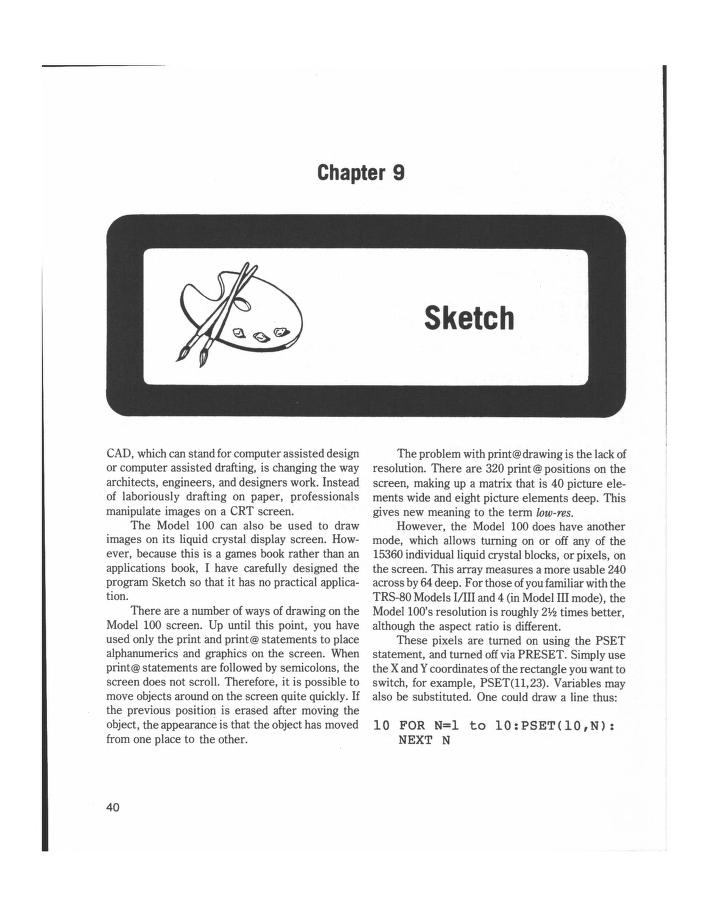
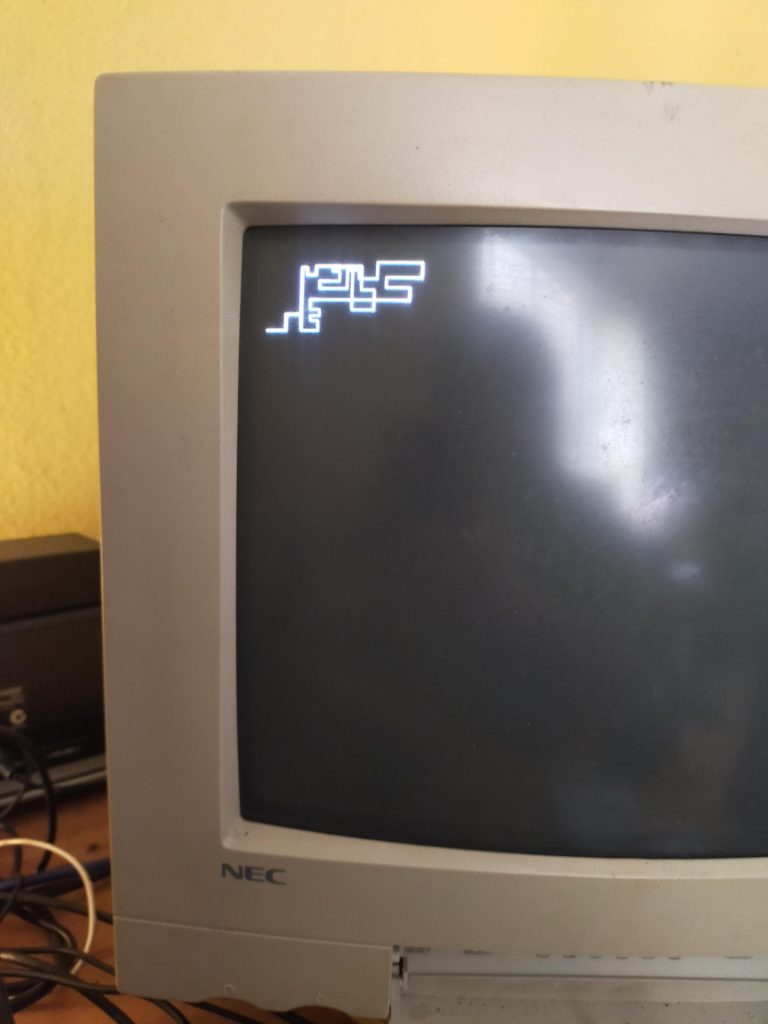
    Please find reproduced here a working port of SKETCH for the TRS Model 100 to Stefan’s BASIC for the Arduino micro-controller platform.

    Full code listing:

    https://basiclang.solarpunk.au/d/15-sketchbas

    Please find the archive.org link to the 1984 book here:

    https://archive.org/details/25GamesForYourTrs80Model100/page/n49/mode/1up

    Live Coding Session

    Video File

    Peertube Streaming

    CODE LISTING

    10 REM ***********
    20 REM *         *
    30 REM * Sketch  *
    40 REM *         *
    50 REM ***********
       
    55 REM *** Instructions ***
       
    60 CLS:PRINT:PRINT
    70 PRINT TAB(12)"Instructions?"
    80 PRINT:PRINT TAB(16)"(Y/N)"
    90 GET A$:IF A$="" GOTO 90
    100 IF A$="Y" OR A$="y" THEN GOTO 110 ELSE GOTO 270
    110 CLS:PRINT:PRINT
    120 PRINT TAB(2)"You may use either Sketch or Draft"
    130 PRINT TAB(2)"modes. Sketch uses a moving line to"
    140 PRINT TAB(2)"draw, while Draft draws lines between"
    150 PRINT TAB(2)"two points you specify by hitting ";CHR$(34);"S";CHR$(34);"."
    160 PRINT:PRINT TAB(1)"= Hit any key for Sketch instructions =";
    170 GET A$:IF A$="" GOTO 170
    180 CLS:PRINT
    190 PRINT TAB(12)"==  Sketch =="
    200 PRINT TAB(13)"[Controls:]"
    210 PRINT TAB(2)"Arrow Keys -- Change direction"
    220 PRINT TAB(2)"Number keys -- Slow down cursor"
    230 PRINT TAB(2)CHR$(34);"F";CHR$(34);" -- Return to top speed"
    240 PRINT TAB(2)"Space Bar -- Toggle cursor (ON)-(OFF)"
    250 PRINT:PRINT TAB(11)"== Hit any key =="
    260 GET A$:IF A$="" GOTO 260
        
    265 REM *** Set Delay ***
        
    270 CLS:PRINT:PRINT
    280 PRINT TAB(6)"Enter speed desired:"
    290 PRINT
    300 PRINT TAB(6)"[1] Fast to [9] Slow"
    310 GET A$:IF A$="" GOTO 310
    320 OG=VAL(A$)*10:IF OG<1 GOTO 310
    330 DL=OG
        
    335 REM ***  Choose Sketch or Draw Mode ***
        
    340 CLS:PRINT:PRINT
    350 PRINT TAB(4)"Do you want:"
    360 PRINT:PRINT TAB(6)"[S]ketch mode"
    370 PRINT TAB(6)"[D]raft mode"
    380 GET A$:IF A$="" GOTO 380
    390 IF A$="S" OR A$="s" GOTO 420
    400 IF A$="D" OR A$="d" GOTO 710
    410 GOTO 380
    420 CLS
    430 REM FOR N=1 TO VAL(RIGHT$(TIME$,2))
    440 REM DM=RND(1)
    450 REM NEXT N
    460 X=239:Y=63
    470 X1=INT(RND(X)*X)+1:Y1=INT(RND(X)*Y)+1
    480 COLOR 255: PLOT X1,Y1
        
    485 REM *** Sketch Mode ***
        
    490 GET A$
    500 X1=X1+XD:IF X1>239 THEN X1=239
    510 IF X1<0 THEN X1=0
    520 Y1=Y1+YD:IF Y1>63 THEN Y1=63
    530 IF Y1<0 THEN Y1=0
    540 DELAY DL*10
    550 IF FLAG<>1 GOTO 570
    560 COLOR 255:PLOT X1,Y1:DELAY 100:NEXT N:COLOR 0:PLOT X1,Y1:GOTO 580
    570 COLOR 255:PLOT X1,Y1
    580 IF A$="" GOTO 490
    590 IF VAL(A$)<1 GOTO 610
    600 DL=DL*VAL(A$)
    610 IF A$="F" OR A$="f" THEN DL=OG
    620 A=ASC(A$)
    630 IF A<>32 GOTO 650
    640 IF FLAG=1 THEN FLAG=0 ELSE FLAG=1
        
    650 IF A=4 GOTO 670
    651 IF A=5 GOTO 690
    652 IF A=19 GOTO 680
    653 IF A=24 GOTO 700
    654 GOTO 490
        
    655 REM *** Change direction of Cursor ***
        
    660 REM ON A-27 GOTO 670, 680, 690, 700
    670 YD=0:XD=1:GOTO 490 REM RIGHT
    680 YD=0:XD=-1:GOTO 490 REM LEFT
    690 XD=0:YD=-1:GOTO 490 REM UP
    700 YD=1:XD=0:GOTO 490 REM DOWN
        
    705 REM *** Draft  Mode ***
        
    710 X1=40:Y1=40
    720 CLS
    730 GET A$
    740 X1=X1+XD:IF X1>239 THEN X1=239
    750 IF X1<0 THEN X1=0
    760 Y1=Y1+YD:IF Y1>63 THEN Y1=63
    770 IF Y1<0 THEN Y1=0
    780 DELAY DL*10
    790 COLOR 255:PLOT X1,Y1
    800 DELAY 50
    810 COLOR 0:PLOT X1,Y1
    820 IF A$="" GOTO 730
    830 IF A$="S" or A$="s" GOTO 850
    840 GOTO 990
        
    845 REM *** Set one point ***
        
    850 PO=PO+1
    860 COLOR 255:PLOT X1,Y1
    870 IF PO=1 THEN X2=X1:Y2=Y1:GOTO 730
        
    875 REM ***  Draw Line ***
        
    880 LINE X1,Y1,X2,Y2
    890 PO=0
    900 GET A$:IF A$="" GOTO 900
    910 IF A$="S" OR A$="s" GOTO 950
    920 A=ASC(A$)
    930 IF A<>4 AND A<>5 AND A<>19 AND A<>24 GOTO 900
    940 GOTO 980
    950 PO=1
    960 X2=X1:Y2=Y1
    970 GOTO 900
        
    975 REM *** Change Cursor Direction ***
    
    980 IF A=4 GOTO 990 REM RIGHT
    981 IF A=5 GOTO 1010 REM UP
    982 IF A=19 GOTO 1000 REM LEFT
    983 IF A=24 GOTO 1020 REM DOWN
    984 GOTO 900
    990 YD=0:XD=1:GOTO 730
    1000 YD=0:XD=-1:GOTO 730
    1010 XD=0:YD=-1:GOTO 730
    1020 YD=1:XD=0:GOTO 730
    
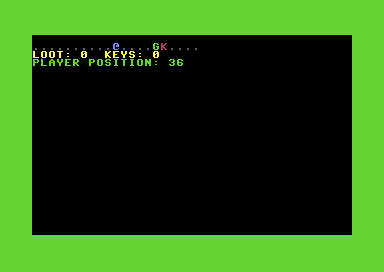
  • GOBLINS.BAS Live Coding Session

    GOBLINS.BAS Live Coding Session


    “Coding done quick”.

    I sped a ~1 hour stream up by 400% and this is what I got.

    This game was published as a type-in pamphlet here.

    You can also download the finished game here.

    Original blog post here.


    mailto:vidak@member.fsf.org

    https://matrix.to/#/@vidak:solarpunk.au

    https://retro.social/@permacomputer


    Jan 2026.

  • A Simple Guide to Porting Your BASIC

    A Simple Guide to Porting Your BASIC

    You may have considered porting some BASIC code from one dialect to another.

    Do not be dissuaded, the process can sometimes be rewarding.

    When porting on BASIC to another, I have found the following guides to be useful:

    Strip out all lines with references to POKE and PEEK.

    This is my preferred strategy. Almost every system addresses memory differently, and has a different memory map.

    Check the way arrays work on your target machine. Especially string arrays.

    Many systems will allow simple string arrays, such as: S$(100)

    But how long are these strings? How does the machine assign and evaluate each index? Some machines may even accept two-dimensional string arrays.

    Every application will make use of some subset, and not every single feature of it’s machine’s arrays, so don’t be daunted. Sometimes the job can be done with very little modification.

    INPUT statements may be an issue. Some parse input differently.

    Does you machine have LINE INPUT, or just INPUT?

    INPUT splits the input into multiple variables on commas in the input, whereas LINE INPUT puts the entire line into one variable.

    File operations like OPEN and CLOSE will accept different arguments.

    This can be quite tricky.

    Since you have made it this far into the blog post, please consider the following table of conversions between my most used BASICS:

    DartmouthAPPLESOFTATARI 8-BITBBC BASICCOMMODORE BASIC V2
    OPENFILE #file, “filenameOPEN filenameOPEN #fileno,mode control code,filenamevar = OPENIN, var = OPENOUTOPEN #exp, fileno, mode, “filename”
    CLOSECLOSE “filenameCLOSE #fileno, #filenoCLOSE #fileno; CLOSE #0 (all files)CLOSE #fileno
    LOADLOAD filenameLOAD “disk:filenameLOAD “filenameLOAD “filename“,8,[disk]
    PRINTPRINT #file, record, …PRINT exp, exp, …PRINT #fileno, record, record, …PRINT #filename, record, record, …PRINT #fileno, record, record, …
    INPUTINPUT #file, record, …INPUT [string,] var, var, …INPUT #[file,disk] varINPUT #filename, record, record, …INPUT “string” var, var, …

    Is your BASIC indexed from one (1) or zero (0)?

    Because this is an easy one. Convert every index accordingly:

    (e.g.) DIM A(255) -> DIM A(256)
    
    (e.g.) FOR I=0 TO 255 -> FOR I=1 TO 256
  • Watch Me Code A Procedurally Generated Game in BASIC!

    Watch Me Code A Procedurally Generated Game in BASIC!

    “Coding done quick”.

    I sped a ~2 hour stream up by 800% and cut some boring bits out, and this is what i got.

    Experimenting with a large, procedurally generated world.

    mailto:vidak@member.fsf.org

    https://matrix.to/#/@vidak:solarpunk.au

    https://retro.social/@permacomputer

    jan 2026

    https://sr.ht/~vidak/oats-for-my-goats

    https://basiclang.solarpunk.au/d/6-game-oats-for-my-goats

  • Scriptor: An Atari Word Processor

    Scriptor: An Atari Word Processor

    Charles Brannon – Editorial Assistant

    Scriptor is an easy-to-use, full-scrolling, character-oriented, multi-function word processor, requiring an Atari 400/800 with a minimum of 32K of memory (40K recommended), an Epson MX-80 or Atari 825 printer, and an Atari disk drive. It is programmed in both BASIC and machine language. For instructions on typing in the program, see the section under: Typing It In.

    Through The Ruby

    Computers don’t just calculate with numbers – they can also work with text. Five inch disks can replace stacks of files. Computers can sort, search, select, and update any kind of information. They can focus information. In this sense, the computer is like the ruby crystal in a laser. Ordinary random light waves are transformed and concentrated through the ruby into a tight, powerful beam. Computers can do the same for information.

    Word Processing

    Electronic text is more “liquid”, easier to work with, than words solidified on paper (hard copy). This is what makes word processing special: the extraordinary editing power it gives you. Distinctions between a rough draft and a final draft are meaningless; the work is typed, changed dynamically, and stored to disk. It can then later be recalled, revised, and printed out. Very little retyping is necessary. What a boon for anyone who writes.

    Converts to word processing immediately notice an improvement in their writing. The entire manuscript becomes “alive”, not committed to paper. Changing a word or a sentence, inserting a line or a paragraph are all accomplished with ease. For example, take just one key, the backspace key (called RUBOUT on some computers or terminals). When this key is struck, the last character typed is erased from the screen. Compare this to the frequently elaborate typewriter correction schemes.

    Besides the disk file, which has already been mentioned and which will be explained in greater detail later, an important concept in word processing is the cursor. Named after the clear plastic slide on a slide rule, the cursor shows you where the next character you type is going to appear. It usually looks like an underline, “__“, or a solid square. Users familiar with any computer have already encountered the cursor. The computer itself doesn’t need a cursor; but since you can type anywhere on the screen, the cursor is vital so that you can know where you”are”.

    The cursor can be moved up, down, left, and right with special keys, usually with arrows on them. To correct the following line:

    The quick brown dox jumped[]

    you would either press backspace ten times, erasing the text as you go, or press cursor-left ten times. The cursor moves “over” the characters without erasing them. It is then resting on the “d”:

    The quick brown [d]ox jumped

    You can correct the error by typing “f”, which overstrikes (replaces) the “d.”

    The quick brown f[o]x jumped

    The cursor can then be moved to the end of the line (ten cursor-rights), and typing resumed.

    This sounds harder than it really is. Cursor editing becomes second nature after only hours of use. The cursor UP/DOWN keys can reach lines of text above and below the current line. It is like rolling a typewriter’s platen up or down, but with one important difference – the “paper” is one continuous, long sheet.

    Getting Specific

    Two very special functions are insert and delete. Insert lets you add text in the middle of a line, by pressing INSERT to insert spaces in the text, and then typing in the word. For example;

    To be or to be, that is the question.[]

    The cursor is placed on the second “to,” and INSERT is pressed four times (three for “n-o-t,” and one for a space):

    To be or []   to be, that is
       the question.

    The word “not” is then typed:

    To be or not[]to be, that is
       the question.

    Delete is used to erase text. As distinguished from mere backspacing or spacing over a word, delete closes up the space after the deleted word:

    Take out a word[]
    1. Take [o]ut a word

    (cursor is moved to “o”)

    1. Take [u]t a word

    (DELETE typed; “a” disappears, “ut a word” moves left.)

    Take [a] word

    (DELETE is typed four times.)

    Insert and delete can also act on words, sentences, lines, or entire paragraphs in a similar way.

    Disk Files

    A “file” is simply a permanent record of your text. When the computer’s power is turned off, it forgets everything except what is “burned” (in ROM memory) into it permanently. Your text is obviously not “burned in,” or you couldn’t ever change it. If you have a blackout, or a fuse blows, say good-bye to your text.

    Catastrophes aside, you certainly don’t want to leave your computer on all the time, or keep the computer tied up with your text forever. Fortunately, you can save your text on disk, ready for any later revisions. You can type it one time, save your text, and print it out when convenient.

    Since a disk can store more than one document (unless it’s very long), you and the computer must have some way to distinguish and separate one file from another. This is usually done via a directory, a list of file names. You access a file by giving the computer the file’s name.

    “Scriptor,” the word processor program at the end of this article, has many features usually found only in professional word processors, but it lacks a few features such as search and replace, justification, data base merge, etc. Also, it is written in BASIC, so it can be rather slow at times. It is, however, aided by several machine language subroutines for time-critical situations such as disk input/output and some editing features.

    Typing It In

    Program 1 is the Scriptor program itself. Type it carefully, since it contains many critical machine language DATA statements. Extra time spent in typing it in will reward you with a smoother, bug-free word processor. Remember to use the COMPUTE! Listing Conventions (see Typing In COMPUTE’s Programs, published every issue). Use the Atari logo key to enter inverse video.

    To give you more memory for text, Scriptor deletes a substantial portion of itself after it initializes (sets up). Don’t worry – the program is busy running while the screen flashes; it just takes a while. The set-up lines from 5000-6999 are automatically erased.

    It you quit the program and try to run it again, the program will automatically try to re-RUN itself anew from disk. If you’ve changed disks, you’ll need to reload it yourself. You should SAVE the program with the filename “D:SCRIPTOR” or change line 110 appropriately. Be sure to SAVE Scriptor after you’ve typed it, before you run it, or you will find a sizeable chunk of your typing erased when you exit. You can free up more memory for text by deleting the “help” function. Take out all lines from 1570 to 1700 and remove line 775. If you’d rather keep this handy aid, leave these lines alone.

    If you get the message “Error in DATA statements” when you run the program, you need to check your typing on the bank of machine language DATA statements at the end of the program. Also make sure you haven’t typed a letter “O” for a zero (the zero is thinner than the “O”).

    If you have an Atari 825 printer, you will need to type in the lines in Program 2. This will replace the lines used for the MX-80 with lines applicable to the 825 80 Column Printer. If you have another printer, refrain from using special characters such as underlining, and you will probably be able to get one of the sets of lines to work.

    Getting Started

    The Scriptor is a full-scrolling, character-oriented word processor. Usage of cursor control keys is similar to normal Atari editor functions, with these exceptions:

    1. is used only to force a carriage return, as at the end of a paragraph, or to print a blank line. The computer will format your line when you print it out, so just type continuously. Do not press at the end of each line. Pressing prints a back-arrow at the end of the line, and erases all text to the end of that line.
    2. Insert and Delete character (CTRL-INSERT/ CTRL-DELETE) work on whole “paragraphs.” A paragraph is a block of lines from the cursor to a “back-arrow.” If there is no back-arrow, one is assumed at the end of text. Therefore, insert and delete can be quite slow if you don’t have a back- arrow somewhere.
    3. Insert and Delete line work on the entire document. The screen will blank during this operation. This is normal and speeds up the process, as it can be slow on long documents.
    4. All TAB controls work normally, just a little slower. will clear all tab settings.
    5. will not clear the screen. It is used to erase all or part of the text. Press to erase all text. Press the Atari logo key to abort the erase function.
    6. The break key is disabled. Use to exit the program.
    7. The ESC key enters the “mini-DOS.” (See below.)
    8. The console keys are “live”; see a description of their functions later.
    9. The Atari logo key is disabled for normal typing. Within prompts, it acts as an “abort” key.

    Getting Control

    Since the Atari is not a dedicated word processor (that means it’s just not a “word processing machine” like a Lanier, but is, rather, a general-purpose computer), it does not have special keys to activate word processing functions. Instead, the combination is used. For example, to quit the program, you would hold down and press . The CTRL key stands for “Control” – it is like a special shift key. The keys are linked mnemonically (easy to remember) to the commands they stand for, such as <P> for Print Text. To get a list of the commands and what they stand for at any time, just press <CTRL-?> (hold down CTRL and press the question mark) for a HELP menu. See Table 1 for a quick-reference chart of the commands.

    Going Around The Block

    An important feature in a word processor is block move and delete. Scriptor lets you “define” a series of up to 23 lines. You can then move these lines to another place in the text with Line Dupli- cate, or delete the defined lines with (Erase: Defined lines). To define a block of lines, just place the cursor on the first line and press . A flashing arrow will appear to the left of the line. Press cursor-down, and another symbol will appear underneath. Press cursor- down until all the desired lines have an arrow to their left. Then press . If you make a mistake, just try again, or press cursor-up while defining.

    To copy these lines to another place, position the cursor at the place you want the lines to ap- pear, and press . If you haven’t defined any lines, this command will be ignored. Note that you can press this key more than once to make many copies of the lines. You may want to delete the defined lines after you move them. Press . You will see the prompt “ERASE:”. Press . The lines will be deleted, just as if you used Delete line multiple times.

    A Mini-DOS

    The ESC key activates the “mini-DOS.” It lets you look at the directory and scratch, rename, lock, or unlock files. When you press , you will see:

    [D]irectory,[L]ock,[U]nlock,[R]ename,
         [S]cratch?

    Press the appropriate key. For all except the directory, you will need to enter a file name. The cursor, a half box, will be at the top of the screen. The only editing key you can use here is backspace.

    Remember that you can abort any time before pressing by pressing the logo key. While the directory is listed, you can press again to keep the directory on the screen while you use one of the other functions. You can also press [SELECT] (see later) to save or recall a file while looking at the directory. If you get an error message at the top of the screen, check the disk and your entry and try again.

    For The Record…

    To save or recall a document, press [SELECT]. The screen will display:

    [S]ave or [R]ecall

    Press the appropriate key, enter the file name, and the document will either be stored or re- trieved. If you Recall a document, it loads starting at the line the cursor is on. This lets you add text to a document. Press START twice to home the cursor to the start of the text. If you get an error message, check to see you have the right disk, consult the DOS Manual, and try again. Remember that your file name must start with a capital letter and be followed by up to seven capital letters or numbers. You can optionally put a three-character “extension” on the file if you separate it with a period, e.g., EDITOR.DOC, DRAFT3.CGB, DUNGEON. MAP, etc. You should not enter the “D:” prefix.

    Printer A La Mode

    Different printers offer special print densities and formats such as boldface, underlining, super- and subscripts, double-width, condensed, proportional spacing, etc. To underline a word or phrase, enclose it in , In other words, <CTRL-,> is underlining on, and <CTRL-.> is underlining off. Underlining works only on the 825 printer. If you have GRAFTRAX installed in your MX-80, underlining produces italics.

    The following is an advanced technique. You can “define” up to ten special characters and print them at any spot in your text. To define a character, set up a format line (sec the discussion of format lines, below) with and enter your definitions such as “1 = 123:2 = 123:3 = 27”, etc. You can then output the CHR$ code of the defined characters by embedding a caret (“^”) in your text, followed by the number (e.g., ^ 4). If you don’t put a number after it, a caret will print; otherwise, the character associated with the number (0-9) will be output. You can also output ASCII characters from within a format line with the “as” format command. For example, “as27:as18” will activate proportional spacing on the 825 printer. Use “as27:as69” for emphasized mode on the MX-80.

    Formatting Text

    Since you are typing in the raw text, with no margins or line breaks, how does the computer print a nice formatted page? The computer assumes a left margin of five, a right margin of 75, single spacing, a page length of 66, and 50 lines to be printed per page. You can change these “default” values with a format line.

    A format line is like an embedded command line. The line starts with a “format character” to prevent the line from being printed out. To get the format character, press . You should get a right-pointed “wedge.” Then type in your commands. All commands are two lowercase letters, usually followed by a number. You can put multiple commands on the same line if you separate them with colons. For example, the following line:

    >lm10:rm70:sp2<-

    will set the left margin to ten, the right margin to 70, and line spacing to two. Here is an explanation of each formatting command. Also see Table 2 for quick reference.

    Note that n represents a number, with no space between the command and the number. No real error-checking is performed on the number.

    as n

    Send byte n to printer.

    cm:

    Comment line. You can type one screen line of comments. They will not be printed to the printer. They are just for your convenience.

    cn n

    Centering. If n = 1, then centering will be ON, and all following lines will be centered until reset by cnO. If n = 0, then centering is turned OFF.

    fp

    Forced paging. Normally, the printer will “page”, or go on to the next page, when the number of lines printed equals your lines per page (lp), which defaults to 50. Forced paging pages to the next page, regardless.

    lm n

    n = left margin, which should be less than the right margin.

    ln n

    Print n blank lines.

    lp n

    Sets lines per page to nn should be less than the page length, to allow some blank space at the bottom of each page.

    nf: filename

    Will “chain” to next specified file, permitting a document to be split up into many parts. The nf ensures that they will all print as one big file. The formatting commands carry over to each file.

    pl n

    Sets the page length, which is almost always (and defaults to) 66.

    rm n

    n = right margin, which should be less than the maximum width and greater than the left margin.

    sp n

    n = 1 single spacing, n = 2 double spacing, n = 3 triple spacing, etc.

    Start The Presses

    To print your document, press . You should see:

    PRINT: (C/F)

    To start printing, just press . The printer head should be positioned at about the start of the page. The “C/F” indicates any selected option. “C” stands for Continuous Print. You would use this option with pinfeed or roll paper. It will automatically page to the start of each sheet. If you do not select continuous print, the computer will beep at the end of each page and pause. You should put in another sheet of paper and press to continue printing.

    Note that pressing a key any other time during printing will abort the printout. The “F” option stands for Fast Printout. It will blank the screen during the printing, increasing printing speed better than 30%. Some people, however, find a blank screen disconcerting. To select one of the options, press either “C” or “F.” The appropriate letter will light up and flash. To reset the option (cancel it), press the key again. Press when you are ready to print the text.

    Customizing Scriptor

    The program is fairly well-structured, with separate sections for all functions. The control keys are executed via a branching IF/THEN “bucket brigade.” Just patch in your own command where desired. Some functions you may want to add are: block transfer (performs both block insert and block delete). Search and Replace, Insert from Disk, simple data merge, etc. Machine language programmers may want to try their hand at speeding up certain aspects of the program, such as Insert Line, Delete Line, and even Print Text.

    Some useful subroutines are:

    GOSUB 540 returns the number of lines the user has typed (not necessarily the maximum number of lines) in EOT. GOSUB 600 clears the top line of the screen and positions the cursor at the first character, ready for a message. GOSUB 460 performs error checking and adjustments on the X-Y position of the cursor. GOSUB 2650 returns an adjusted (uppercase if AL = 1, no cursor controls, etc.) character in A. GOSUB 2730 is a pseudo-INPUT routine that returns IN$. Variable MX controls the maxi- mum number of characters.

    TRAP 2170 will vector errors to an “I/O Error” message. There are two re-entry points for the editor proper: GOTO 650 which clears and “refreshes” the screen, and GOTO 680 which just adjusts the cursor and continues keyboard entry (faster).

    Primary variables are: CL – the pointer to the top line (from 0-#lines) of the screen; X – the horizontal position of the cursor 2-39; Y – the vertical position of the cursor on the screen, 1-23; TXS – the string that contains all the text and is organized in 38 character substrings, one for each line; T$ and T – “temporary variables”; A – usually a keystroke typed; SCR – the address of the screen memory origin; NL – number of defined lines; FRL – the starting line in text of the defined lines; RL – the starting line in TX$ for reserved lines (the buffer). Several constants are QO, Ql, Q23- which return 0, 1, or 23 (saves memory); L2 = 38; L = 40; B$ is 38 null (CHR$(0)) characters.

    Quick Reference

    Table 1: Editing Commands

    Control Keys

    AAdvance one screen forward
    BBack up one screen
    DDefine Lines
    FPrint Format Character
    GGo to specified line
    KClear all tab settings
    LDuplicate defined lines
    PPrint Document
    QQuit Program
    SHIFT-INSERTInsert a line
    SHIFT-DELETEDelete a line
    CTRL-INSERTInsert a space
    CTRL-DELETEDelete a character
    CLEARErase:
    A = All
    R = Remainder
    D = Defined Lines
    CAPS/LOWRUpper or lowercase
    ESCMiniDOS
    Cursor keysMoves cursor with two-way scrolling
    [OPTION]Non-destructive carriage-return
    [SELECT]Save or Recall text
    [START]“Home” cursor
    [CTRL-,]Underlining ON
    [CTRL-.]Underlining OFF
    ^xPrint special character

    Table 2: Formatting Commands

    CommandDescriptionDefault
    as nSend ASCII character n to printer.
    cm:xxxxComment line
    cn nCentering 1 = on, 0 = off0 Off
    fpForced Paging
    lm nSet left margin to n5
    ln nDo n linefeeds
    lp nSet lines per page to n50
    nf: fileLink to Next File
    pl nPage length66
    rm nSet right margin to n75
    sp nSet line spacing1 (single)

    Program 1

    100 REM SCRIPTOR WORD PROCESSOR
    110 GOTO 5000
    455 RUN "D:SCRIPTOR"
    460 PF=Q0:IF X<2 THEN X=39:Y=Y-Q1
    470 IF X>39 THEN X=2:Y=Y+Q1
    480 IF Y<Q1 THEN Y=Q1:CL=CL-Q1:PF=Q1
    490 IF Y>Q23 THEN Y=Q23:CL=CL+Q1:PF=Q1
    500 IF CL<Q0 THEN CL=Q0
    510 IF CL>(MXL-Q23) THEN CL=MXL-Q23
    520 IF PF=Q0 THEN RETURN
    530 LOC=CL*L2+Q1:T=USR(SCRZAP,ADR(TX$(LOC))):RETURN
    540 REM *** FIND END OF TEXT
    550 P=ADR(TX$):T=P+RL*L2-Q1
    560 A=USR(EDCOM,T,P,2):A=A-P
    570 LC=A:EOT=INT(A/L2)
    580 RETURN
    590 REM *** ERASE TOP LINE
    600 COLOR 32:PLOT Q1,Q0:DRAWTO L2,Q0:PLOT Q1,Q0:RETURN
    610 REM *** START OF EDITOR
    611 MXL=INT(FRE(Q0)/40)-25:RL=MXL+1
    612 DIM TX$((MXL+Q23)*L2):? CHR$(125);
    613 TX$=CHR$(Q0):TX$((MXL+Q23)*L2)=TX$:TX$(2)=TX$
    620 SCR=PEEK(88)+256*PEEK(89):POKE 559,46:POKE 842,12
    630 X=2:Y=Q1:CL=Q0:POKE 702,Q0
    640 REM *** ENTRY FOR EACH PAGE
    650 POKE 54286,192
    655 POSITION Q0,Q0:? "{7 SPACES}Scriptor Word Processor";:COLOR 32:DRAWTO L2,Q0:PLOT 32,Q0
    660 LOC=CL*L2+Q1:T=USR(SCRZP,ADR(TX$(LOC)))
    670 IF TF THEN TF=Q0:GOTO 810
    675 IF FIRST=Q0 THEN POSITION 31,Q0:? MXL;" Free";:TF=Q1:FIRST=Q1
    680 POKE 53248,X*4+44
    690 IF Y=OY THEN 740
    710 ADJOY=OY*4+16:ADJY=Y*4+16
    720 A=USR(CURSOR,PMB+ADJOY,Q0):A=USR(CURSOR,PMB,ADJY,15):OY=Y
    740 K=PEEK(53279):IF K<7 THEN 2570
    770 T=PEEK(764):IF T=255 OR T=39 OR T=154 THEN 740
    775 IF T=166 THEN POKE 764,255:GOTO 1570
    790 POKE 694,Q0:A=USR(GCHAR)
    800 IF TF THEN 650
    810 IF A<32 OR A>122 OR A=96 THEN 880
    820 A=A-32*(A<96)
    830 POKE SCR+X+L*Y,A
    840 LOC=(CL+Y-Q1)*L2+X-Q1
    850 TX$(LOC,LOC)=CHR$(A)
    860 X=X+Q1-BF:GOSUB 460
    870 BF=Q0:GOTO 680
    880 IF A<>155 THEN 910
    890 GOSUB 2640:POKE SCR+X+L*Y,94:TX$(LOC,LOC+L2-X+Q1)=B$:X=2:Y=Y+1
    900 TX$(LOC,LOC)=CHR$(94):GOSUB 460:GOTO 650
    910 IF A=6 THEN A=127:GOTO 830
    920 IF A=28 THEN Y=Y-Q1:GOSUB 460:GOTO 680
    930 IF A=29 THEN Y=Y+Q1:GOSUB 460:GOTO 680
    940 IF A=30 THEN X=X-Q1:GOSUB 460:GOTO 680
    950 IF A=96 THEN A=74:GOTO 830
    960 IF A=31 THEN X=X+Q1:GOSUB 460:GOTO 680
    970 IF A=Q0 THEN A=72:GOTO 830
    980 IF A=126 THEN X=X-Q1:GOSUB 460:A=Q0:BF=Q1:GOTO 830
    1040 IF A<>255 THEN 1070
    1050 A=USR(EDCOM,ADR(TX$((CL+Y-Q1)*L2+X-Q1)),ADR(TX$(MXL*L2+37)),Q0)
    1060 GOTO 650
    1070 IF A<>254 THEN 1100
    1080 A=USR(EDCOM,ADR(TX$((CL+Y-Q1)*L2+X-Q1)),ADR(TX$(MXL*L2+37)),Q1)
    1090 GOTO 650
    1100 IF A<>157 THEN 1160
    1110 GOSUB 590:? "Insert line";
    1120 GOSUB 540:POKE 559,Q0
    1130 FOR I=EOT+(EOT<MXL) TO CL+Y STEP -Q1:T$=TX$((I-Q1)*L2+Q1,I*L2):TX$(I*L2+Q1,I*L2+L2)=T$:NEXT I
    1140 T=(CL+Y-Q1)*L2:TX$(T+Q1,T+L2)=B$
    1150 X=2:POKE 559,46:GOTO 650
    1160 IF A=159 THEN GOSUB 590:? "Tab set at ";X-Q1:TF=Q1:TB$(X-Q1,X-Q1)="*":GOTO 740
    1170 IF A=158 THEN GOSUB 590:? "Tab cleared at ";X-Q1:TF=Q1:TB$(X-Q1)=CHR$(Q0):GOTO 740
    1180 IF A<>127 THEN 1230
    1190 IF TB$=B$ THEN GOSUB 590:? "No tabs set":TF=Q1:GOTO 740
    1200 FOR I=X TO L2:IF TB$(I,I)=CHR$(Q0) THEN NEXT I:T=L2:X=2:Y=Y+Q1:GOSUB 460:GOTO 1200
    1210     T=I:I=L2:NEXT I
    1220 X=T+Q1:GOTO 680
    1230 IF A<>156 THEN 1290
    1240 GOSUB 590:? "Delete Line";
    1250 GOSUB 540:POKE 559,Q0
    1260 FOR I=CL+Y-Q1 TO EOT:T$=TX$((I+Q1)*L2+Q1,(I+2)*L2):TX$(I*L2+Q1,I*L2+L2)=T$:NEXT I
    1270 T=EOT*L2:TX$(T+Q1,T+L2)=B$
    1280 X=2:POKE 559,46:GOTO 650
    1290 IF A=11 THEN GOSUB 590:TF=Q1:? "Clear all tabs":TB$=B$:GOTO 740
    1320 IF A<>125 THEN 1450
    1330 GOSUB 590:? "Erase: ";
    1340 GOSUB 2650
    1350 IF A=155 THEN 650
    1355 IF A<>65 THEN 1370
    1360 ? "ALL - ";:GOSUB 2540
    1365 GOTO 613
    1370 IF A<>82 THEN 1380
    1372 ? "Remainder - ";:GOSUB 2540:GOSUB 2640
    1375 TX$(LOC)=CHR$(Q0):TX$((MXL+Q23)*L2)=CHR$(Q0):TX$(LOC+Q1)=TX$(LOC):GOTO 650
    1380 IF A<>68 OR NL=-Q1 THEN 650
    1400 ? "Defined Lines - ";
    1410 GOSUB 2540:POKE 559,Q0:GOSUB 540
    1420 FOR I=FRL=-Q1 TO EOT:T$=TX$((I+NL+Q1)*L2+Q1,(I+NL+2)*L2):TX$(I*L2+Q1,I*L2+L2)=T$:NEXT I
    1430 FOR I=EOT-NL TO EOT:TX$(I*L2+Q1,I*L2+L2)=B$:NEXT I:NL=-Q1
    1440 POKE 559,46:GOTO 650
    1450 IF A<>4 THEN 1810
    1460 GOSUB 590:? "Define Lines";
    1470 FL=CL:FR=Y:FRL=FL+FR:NL=Q0
    1480 POKE SCR+1+L*(FR+NL),223
    1490 LOC=CL*L2+(FR+NL-Q1)*L2:T=RL*L2+NL*L2:T$=TX$(LOC+Q1,LOC+L2):TX$(T+Q1,T+L2)=T$
    1500 GOSUB 2650
    1510 IF A=29 AND FR+NL<22 THEN NL=NL+Q1:GOTO 1480
    1520 IF A=28 AND FR+NL>FR THEN POKE SCR+1+L*(FR+NL),Q0:NL=NL-Q1
    1530 IF A=155 THEN 1550
    1540 GOTO 1500
    1550 FOR I=Q0 TO NL:POKE SCR+1+L*(FR+I),Q0:NEXT I:GOTO 650
    1570 POKE 53248,Q0:PRINT CHR$(125):POSITION 13,Q0:? " HELP Screen "
    1580 ? "{DOWN}{TAB}{3 SPACES}Control Keys:"
    1590 ? "A=Advance Page B=Page Back"
    1595 ? "D=Define Lines F=Print form at char."
    1610 ? "K=Kill all tabs L=Line Duplicate"
    1620 ? "P=Print text{4 SPACES}Q=Quit"
    1630 ? "Atari Key=Cancel Command":?
    1635 ? "^x Print special character"
    1640 ? "{DOWN}[CLEAR] Erase:All Defined Lines":POKE 85,16:? "Remainder"
    1650 ? "[OPTION] Non-destructive CR"
    1660 ? "{DOWN}[SELECT] Filer:Recall or Save"
    1670 ? "{DOWN}[START] 'Home' cursor. Press twice to go to start of text."
    1680 ? "{DOWN}[ESC] Mini DOS"
    1700 ? "{DOWN}Press RETURN.":A=USR(GCHAR):GOTO 650
    1810 IF A<>12 THEN 1910
    1820 GOSUB 590:? "Duplicate defined lines";
    1830 IF NL<Q0 THEN 650
    1840 FOR I=Q0 TO NL
    1850     IF CL+Y+I-Q1>MXL THEN I=NL:GOTO 1900
    1860     T=RL*L2+I*L2
    1870     T2=CL*L2+(Y+I-Q1)*L2
    1880     T$=TX$(T+Q1,T+L2)
    1890     TX$(T2+Q1,T2+L2)=T$
    1900 NEXT I:Y=Y+NL+Q1:GOSUB 460:GOTO 650
    1910 IF A<>27 THEN 2400
    1920 POSITION 2,Q0:? "Directory,Lock,Unlock,Rename,Scratch?"
    1930 GOSUB 2650:J=A
    1940 IF J<>76 AND J<>85 AND J<>83 AND J<>68 AND J<>82 THEN 1930
    1950 IF J<>ASC("D") THEN 2020
    1960 ? CHR$(125):POKE 53248,Q0
    1970 TRAP 2170:OPEN #2,6,Q0,"D:*.*"
    1980 INPUT #2,T$:? T$:IF LEN (T$)<17 THEN 2000
    1990 GOTO 1980
    2000 CLOSE #2:TRAP 40000:GOSUB 590:? "Press a key...";:OK=1:GOSUB 2650:IF A=27 THEN 1920
    2010 GOTO 650
    2020 GOSUB 590:J=A
    2030 IF J=76 THEN ? " LOCK  >";:J=35
    2040 IF J=83 THEN ? "SCRATCH>";:J=33
    2050 IF J=ASC("R") THEN 2130
    2070 ? "Enter Filename:";
    2080 MX=12:AL=Q1:GOSUB 2720
    2090 T$(3)=IN$:T$(1,2)="D:":POSITION 10,Q0:? DEL$(1,15);
    2100 TRAP 2170:IF J=33 THEN POSITION 24,Q0:GOSUB 2540:COLOR 32:PLOT 24,Q0:DRAWTO 38,Q0
    2110 TRAP 2170:XIO J,#2,Q0,Q0,T$:TRAP 40000
    2120 TRAP 40000:GOTO 650
    2130 GOSUB 590:? "RENAME>Current name? ";:MX=12:GOSUB 2720:T$(3)=IN$:T$(1,2)="D:"
    2140 GOSUB 590:? "RENAME>New name? ";:MX=12:GOSUB 2720:T$(LEN(T$)+Q1)=",":T$(LEN(T$)+Q1)=IN$
    2150 TRAP 2170:XIO 32,#2,Q0,Q0,T$:TRAP 40000
    2160 GOTO 650
    2170 TRAP 2170:POKE 559,46:CLOSE #2:CLOSE #3:GOSUB 590:? CHR$(253);"I/O Error #";PEEK(195);:TF=Q1:GOTO 740
    2180 GOSUB 590:? "Save or Recall";
    2190 ICCOM=834+48:ICBAL=ICCOM+2:ICBLL=ICBAL+4:ICSTAT=835+48:REM IOCB#3
    2200 GOSUB 2650:IF A=155 THEN 1380
    2210 IC A<>ASC("S") THEN 2290
    2220 GOSUB 600:? "SAVE:{3 SPACES}File name? ";:MX=12:GOSUB 2720:T$(3)=IN$:T$(1,2)="D:":GOSUB 550
    2230 POSITION 5,0:? DEL$(1,12);"ING";
    2232 TRAP 2238:OPEN #3,4,Q0,T$:CLOSE #3:GOSUB 600:? "REPLACE:  ";IN$;" - ";:GOSUB 2540
    2233 GOSUB 600:? " REPLACING ";IN$:GOTO 2240
    2238 CLOSE #3:IF PEEK(195)<>170 THEN 2170
    2240 TRAP 2170:OPEN #3,8,Q0,T$
    2250 POKE ICCOM,11:P=ADR(TX$):POKE ICBAL+Q1,INT(P/256):POKE ICBAL,P-(INT(P/256)*256)
    2260 LN=(CL+EOT+Q1)*L2:POKE ICBLL+Q1,INT(LN/256):POKE ICBLL,LN-(INT(LN/256)*256)
    2270 A=USR(ADR(CIO$),48):ERR=PEEK(ICSTAT):POKE 195,ERR:IF ERR>1 THEN 2170
    2280 CLOSE #3:TRAP 40000:POKE 53279,Q0:GOTO 650
    2290 IF A<>ASC("R") THEN 650
    2300 LK=Q0
    2310 GOSUB 590:? "RECALL: Filename? ";:MX=12:GOSUB 2720:T$(3)=IN$:T$(1,2)="D:"
    2315 LOC=(CL+Y-Q1)*L2+Q1:TX$(LOC)=CHR$(Q0):TX$((MXL+Q23)*L2)=CHR$(Q0):TX$(LOC+Q1)=TX$(LOC)
    2320 TRAP 2170:POSITION 8,0:? DEL$(1,8);"ING";:OPEN #3,4,Q0,T$
    2330 ICCOM=834+48:ICBAL=ICCOM+2:ICBLL=ICBAL+4
    2340 POKE ICCOM,5:P=ADR(TX$((CL+Y-Q1)*L2+Q1)):POKE ICBAL+Q1,INT(P/256):POKE ICBAL,P-(INT(P/256)*256)
    2350 LN=(MXL-(CL+Y-Q1))*L2:POKE ICBLL+Q1,INT(LN/256):POKE ICBLL,LN-(INT(LN/256)*256)
    2360 A=USR(ADR(CIO$),48):ERR=PEEK(ICSTAT):POKE 195,ERR:IF ERR>1 AND ERR<>136 THEN 2170
    2370 CLOSE #3:POKE 53279,Q0:TRAP 40000:IF LK=Q0 THEN 650
    2380 CL=Q0:Y=Q1:X=2:T=USR(SCRZAP,ADR(TX$))
    2390 GOTO 2950
    2400 IF A<>17 THEN 2410
    2403 GOSUB 600:? "QUIT: ";:GOSUB 2540
    2405 POKE 53277,Q0:POKE 53248,Q0:POKE 53774,192:POKE 16,192:GRAPHICS Q0:POKE 702,64:END
    2410 IF A=16 THEN 2840
    2420 IF A=Q1 THEN CL=CL+Q23:Y=Q1:GOSUB 460:GOTO 650
    2430 IF A=2 THEN CL=CL-Q23:Y=Q1:GOSUB 460:GOTO 650
    2500 GOTO 640
    2540 ? "Are you sure?";:GOSUB 2650:IF 1-(A=121 OR A=89) THEN POP :GOTO 650
    2550 RETURN
    2570 REM ***  Handle console keys
    2580 POKE 764,130:A=USR(GCHAR):POKE 77,Q0
    2590 IF K=5 THEN 2180
    2600 IF K=3 THEN X=2:Y=Y+Q1:GOSUB 460:GOTO 680
    2610 IF K=6 AND Y=Q1 AND X=2 THEN CL=Q0:X=2:GOTO 650
    2620 IF K=6 THEN Y=Q1:X=2:GOTO 650
    2630 GOTO 740
    2640 LOC=(CL+Y-Q1)*L2+X-Q1:RETURN
    2650 T=Q0:REM GET A KEY
    2660 IF PEEK(20)>20 THEN T=Q1-T:POKE 20,Q0:POKE 755,T*2
    2665 IF OK THEN IF PEEK(53279)=5 THEN POKE 755,2:POKE 559,46:POP :POKE 764,130:A=USR(GCHAR):OK=0:GOTO 2180
    2670 IF PEEK(764)=255 THEN 2660
    2680 IF PEEK(764)=154 THEN 2660
    2690 IF PEEK(764)=39 THEN POKE 764,255:SOUND Q0,5,12,4:POP :FOR T=1 TO 5:NEXT T:SOUND Q0,Q0,Q0,Q0:GOSUB 2710:GOTO 650
    2700 TRAP 2700:A=USR(GCHAR):TRAP 40000:IF A>96 AND A<123 THEN A=A-32*AL
    2710 POKE 755,2:POKE 559,46:RETURN
    2720 REM ***  PSEUDO-INPUT
    2730 IN$=""
    2740 ? CHR$(21);CHR$(30);:GOSUB 2650:? CHR$(32);CHR(30);
    2750 IF A=155 THEN 2820
    2760 IF A=126 AND LEN(IN$)>1 THEN IN$=IN$(1,LEN(IN$)-Q1):? CHR$(A);:GOTO 2740
    2770 IF A=126 AND LEN(IN$)=Q1 THEN ? CHR$(A);:GOTO 2730
    2780 IF LEN(IN$)=MX THEN 2740
    2790 IF (A<32 OR A>90) AND A<96 OR A>122 THEN 2740
    2800 ? CHR$(A);:IN$(LEN(IN$)+Q1)=CHR$(A)
    2810 GOTO 2740
    2820 AL=Q1:IF IN$="" THEN POP :GOTO 650
    2830 RETURN
    2840 REM ***  Printer Output
    2850 GOSUB 590:? "PRINT: (C/F)"
    2860 CON=Q0:F=Q0:FOR I=Q0 TO 9:PC(I)=48+I:NEXT I
    2870 GOSUB 2650:IF A=155 THEN 2910
    2880 IF A=67 THEN CON=1-CON:POSITION 10,Q0:? CHR$(67+128*CON);:GOTO 2870
    2890 IF A=70 THEN F=1-F:POSITION 12,Q0:? CHR$(70+128*F):GOTO 2870
    2900 GOTO 2870
    2910 TRAP 2170:OPEN #2,8,Q0,"P:"
    2920 GOSUB 590:? "Printing..."
    2930 LM=5:RM=75:CN=Q0:NL=Q0
    2940 SP=1:PL=66:LP=50:C=LM
    2950 GOSUB 540:IF F=1 THEN POKE 559,Q0
    2960 FOR P=Q1 TO LC
    2970     IF PEEK(764)<255 THEN GOSUB 2650:POP :GOTO 3140
    2980     Z=ASC(TX$(P))
    2990     IF CN=Q1 AND Z<>127 THEN 3460
    3000     IF Z<62 OR (Z>96 AND Z<123) THEN 3070
    3010     IF Z=94 THEN GOSUB 3210:GOSUB 3150:GOTO 3120
    3020     IF Z=72 THEN UL=Q1:PUT #2,27:PUT #2,52:GOTO 3120
    3030     IF Z=74 THEN UL=Q0:PUT #2,27:PUT #2,53:GOTO 3120
    3040     T=ASC(TX$(P+Q1)):IF Z=62 AND T>15 AND T<26 THEN PUT #2,PC(T-16):P=P+1:GOTO 3120
    3060     IF Z=127 THEN 3230
    3070     IF C=LM THEN FOR I=Q1 TO LM:PUT #2,32:NEXT I
    3080     C=C+1
    3090     PUT #2,Z+32*(Z<64)
    3100     T=Q0:IF RM-C>=10 THEN 3110
    3105     FOR I=1 TO LEN(BRK$):IF Z+32<>ASC(BRK$(I,I)) THEN NEXT I:GOTO 3110
    3107     TT=ASC(TX$(P+Q1)):IF TT=Q0 OR TT=94 OR Z=Q0 OR Z=13 THEN I=LEN(BRK$):NEXT I:GOSUB 3150:T=Q1
    3110     IF T=Q1 AND ASC(TX$(P+Q1))=Q0 THEN P=P+Q1:IF P<LC THEN 3110
    3120 NEXT P
    3130 GOSUB 3150
    3140 PRINT #2,CLOSE #2:POKE 559,46:TRAP 40000:GOTO 650
    3150 FOR I=Q1 TO SP:PRINT #2:NEXT I
    3160 C=LM:NL=NL+SP:PRINT #2:NEXT I
    3160 C=LM:NL=NL+SP:IF CN<Q0 THEN CN=Q1
    3170 IF NL<LP THEN RETURN
    3180 IF CON=Q0 THEN FOR I=Q0 TO 255 STEP 17:SOUND Q0,255-I,Q0,15-INT(I/17):NEXT I:T=USR(GCHAR):GOTO 3200
    3190 FOR I=Q1 TO PL-LP:PRINT #2:NEXT I
    3200 NL=Q0:RETURN
    3210 REM ***  SKIP TRAILING BLANKS
    3220 T=INT(P/L2):P=(T+Q1-(P/L2=T))*L2:RETURN
    3230 REM Handle special formatting
    3240 P=P+Q1
    3250 CM$=TX$(P,P+Q1):T$=""
    3260 FOR I=P+2 TO LC
    3270     IF TX$(I,I)>=CHR$(16) AND TX$(I,I)<CHR$(26) THEN T$(LEN(T$)+Q1)=CHR$(ASC(TX$(I,I))+32):NEXT I
    3280 V=Q0:P=I:TRAP 3290:V=VAL(T$)
    3290 TRAP 2170:IF CM$="cn" THEN CN=V
    3300 IF CM$="ln" THEN FOR J=Q1 TO V:GOSUB 3150:NEXT J
    3310 IF CM$="sp" THEN SP=V
    3320 IF CM$="pl" THEN PL=V
    3330 IF CM$="lp" THEN LP=V
    3340 IF CM$="lm" AND V>0 THEN LM=V:C=V
    3350 IF CM$="rm" AND V>0 THEN RM=V
    3360 IF CM$="fp" THEN GOSUB 3180:POKE 559,46-46*F
    3370 IF CM$="as" THEN PUT #2,V
    3380 IF CM$="cm" THEN FOR I=P TO P+79:IF TX$(I,I)<>"^" THEN NEXT I:I=I-Q1
    3390 IF CM$="cm" THEN P=I+Q1:GOTO 3450
    3400 IF CM$<>"nf" THEN 3430
    3410 T$="D:":FOR I=Q0 TO 11:Z=ASC(TX$(P+I,P+I)):IF Z<>94 AND P+I<=LC THEN T$(3+I)=CHR$(Z+32*(Z<63)):NEXT I
    3415 TX$(Q1)=CHR$(Q0):TX$((MXL+Q23)*L2)=CHR$(Q0):TX$(2)=TX$
    3420 POKE 559,46:GOSUB 590:? "Printing ";T$:LK=Q1:CL=Q0:Y=Q1:GOTO 2320
    3430 IF ASC(CM$)>15 AND ASC(CM$)<26 THEN PC(ASC(CM$)-16)=V
    3440 IF TX$(P,P)<>"^" AND P<LC THEN 3240
    3450 GOSUB 3220:P=P+Q1:GOTO 2970
    3460 REM *** CENTRE STRING
    3470 LN=Q0:FOR I=P TO P+79:IF TX$(I,I)<>"^" THEN LN=LN+Q1:NEXT I
    3480 WIDTH=RM-LM:UL=Q0:IF TX$(P,P)=CHR$(72) THEN UL=Q1
    3490 FOR I=Q1 TO (WIDTH-LN)/2+LM:PUT #2,32:NEXT I
    3500 C=C+I:CN=-Q1:GOTO 2990
    5000 REM  INITIALISATION
    5010 GRAPHICS 17:SETCOLOR 4,1,10
    5020 DL=PEEK(560)+256*PEEK(561)+4:POKE DL+5,7:POKE DL+10,7:POKE DL+14,7
    5030 POSITION 6,4:? #6;"scriptor":POSITION 3,7:? #6;"WORD PROCESSOR"
    5040 ? #6:? #6;" ";CHR$(136);CHR$(227);CHR$(153);CHR$(152);CHR$(147)
    5045 ? #6:? #6;" small systems svcs";CHR$(14);
    5050 ? #6:? #6;"{3 SPACES}CHARLES BRANNON"
    5070 Q0=0:Q1=1:Q23=23:RL=MXL+Q1:SCRZAP=1680:CURSOR=1739:EDCOM=1536:AL=1:L2=38:GCHAR=1303:SND=1331
    5080 DIM T$(79),IN$(20),B$(L2),TB$(L2),CM$(2),BRK$(8),PC(9),DEL$(20),CIO$(7)
    5090 B$=CHR$(Q0):B$(L2)=B$:B$(2)=B$:DEL$=CHR$(254):DEL$(20)=DEL$:DEL$(2)=DEL$
    5100 TB$=B$:BRK$=" ,.!?;:-":CIO$="hhh":CIO$(4)=CHR$(170):CIO$(5)="LV":CIO$(7)=CHR$(228)
    5110 OPEN #1,4,Q0,"K:"
    5120 T=Q0:OY=Q0:CL=Q0:L=40:NL=-Q1
    5130 PMB=PEEK(106)-8:POKE 559,46:POKE 53248,Q0
    5140 POKE 54279,PMB:POKE 53277,3
    5150 PMB=PMB*256+512:POKE 704,56
    5160 FOR I=Q0 TO 255:POKE PMB+I,Q0:POKE 708+3*RND(Q0),PEEK(53770):NEXT I
    5180 SETCOLOR 4,8,2
    5250 FOR I=0 TO 70:READ A:POKE 1280+I,A:CHECKSUM=CHECKSUM+A:POKE 708+3*RND(Q0),PEEK(53770):NEXT I
    5290 FOR I=0 TO 247:READ A:POKE 1536+I,A:CHECKSUM=CHECKSUM+A:POKE 708+3*RND(Q0),PEEK(53770):NEXT I
    5300 IF CHECKSUM<>47765 THEN PRINT CHR$(253);"Error in DATA statements...":END
    5310 DATA 72,138,72,169,10,162,2,141,10,212,141,24,208,141,26,208,142,23,208,104,170,104,64
    5320 DATA 104,173,252,2,201,255,240,249,133,124,162,255,142,252,2,32,51,5,32,254,246,133,212,169,0,133,213,96
    5330 DATA 162,0,142,0,210,162,15,142,1,210,160,0,234,200,208,252,202,16,244,96
    5340 DATA 216,104,104,133,213,104
    5350 DATA 133,212,104,133,204,104
    5360 DATA 133,203,104,104,208,47
    5370 DATA 32,109,6,165,205,76
    5380 DATA 43,6,160,0,177,205
    5390 DATA 200,145,205,198,205,165
    5400 DATA 205,201,255,208,2,198
    5410 DATA 206,197,212,208,235,165
    5420 DATA 206,197,213,208,229,160
    5430 DATA 0,177,205,200,145,205
    5440 DATA 136,152,145,205,96,201
    5450 DATA 1,240,3,76,221,6
    5460 DATA 32,109,6,76,91,6
    5470 DATA 160,1,177,212,136,145
    5480 DATA 212,230,212,208,2,230
    5490 DATA 213,165,213,197,206,208
    5500 DATA 237,165,212,197,205,208
    5510 DATA 231,169,0,168,145,212
    5520 DATA 96,165,212,133,205,165
    5530 DATA 213,133,206,160,0,177
    5540 DATA 205,201,94,240,18,230
    5550 DATA 205,208,2,230,206,165
    5560 DATA 206,197,204,208,238,165
    5570 DATA 205,197,203,208,232,96
    5580 DATA 165,88,133,203,165,89
    5590 DATA 133,204,104,104,133,206
    5600 DATA 104,133,205,162,24,76
    5610 DATA 188,6,160,0,177,205
    5620 DATA 200,200,145,203,136,192
    5630 DATA 38,208,245,24,169,38
    5640 DATA 101,205,133,205,144,2
    5650 DATA 230,206,24,169,40,101
    5660 DATA 203,133,203,144,2,230
    5670 DATA 204,202,208,218,96,104
    5680 DATA 104,133,204,104,133,203
    5690 DATA 104,168,104,145,203,200
    5700 DATA 192,4,208,249,96,160
    5710 DATA 0,177,212,208,20,198
    5720 DATA 212,165,212,201,255,208
    5730 DATA 2,198,213,197,203,208
    5740 DATA 238,165,213,197,204,208
    5750 DATA 232,96
    6000 GRAPHICS 0:POKE 559,Q0:POKE 16,64:POKE 53774,64
    6010 FOR I=5000 TO 5900 STEP 100:? CHR$(125):POSITION 2,3:FOR J=I+90 TO I STEP -10:? J:NEXT J:? 110:? "CONT"
    6020 POKE 712,PEEK(53770):POKE 842,13:POSITION 0,0:STOP 
    6030 POKE 842,12:NEXT I
    6040 SETCOLOR 2,12,Q0:SETCOLOR 4,8,10:SETCOLOR Q1,Q0,12:POKE 752,Q1
    6050 POKE PEEK(560)+256*PEEK(561)+3,194:POKE 512,0:POKE 513,5
    6060 ? CHR$(125):? :? :FOR I=6000 TO 6060 STEP 10:? I:NEXT I:? "GOTO610":POSITION 0,0:POKE 842,13:STOP
  • WRDPRO

    WRDPRO

    Word Processing Text Editor Rev. 1.1

    John W. Swain

    SCIENTIFIC RESEARCH INC.

    Brown, R.W. (1977) Basic software library. 7, professional programs Vol 7. Key Biscayne, Fla: Scientific Research Inst.

    This program is designed to allow owners of micro-computers the capability of rearranging text material and then printing it out in a variety of formats. While this version is not quite as comprehensive as our WWP rev:30 program, it should easily run on most systems with disk extended Basic and 15K Bytes of free user memory for execution.

    There are a few statements appearing in this program that may not be in the version of Basic you are using. The first is the Console statement, if your (/) Basic doesn’t have this command then just remove it everywhere it appears in 1 the program, no other conversion is necessary. Line Input and Instr are two more statements that may not be in the version of Basic you are using. The Instr statement may be replaced by a conversion subroutine using the MID$ statement, if necessary. A typical conversion for the Instr statement would a be similar to the subroutine used on line 4075 on page 243 of Volume I. Here F1 is set equal to one (1) and the SST statement would be replaced by the MID$ statement; see appendix B, page 925: Volume V.

    This program offers nine major modes of operation with a number of submode operations. Individuals requiring a considerably more comprehensive version, should complete a copy of our software licensing agreement included at the end of this volume and return it with an order or contact us directly to obtain more details.

    Following the source code listing for WRDPRO are a series of sample runs which illustrate the usefulness and versatility of the routines contained within this program. It should be noted that this version of WRDPRO rev:1 can only utilize text files that fit entirely into the working memory of the system being used. Therefore, if your Basic requires 20K and you only have 50K Bytes of total memory, then the largest text file you could build and use would only be 15K Bytes long; this would be equivalent to approximately four standard size, single spaced, typed pages of text. While this program does limit the size of your text files to the size of your working memory, it does not limit the number of files you may have, making it quite easy for you to have several files representing separate portions of the total text material.

    Code Listing

    REM WRD PROC    8/11/1977
    
    REM THE PRINCIPAL DIFFERENCE BETWEEN THE INPUT AND LINE INPUT
    REM STATMENTS IS THAT LINE INPUT ACCEPTS SPECIAL CHARACTERS (SUCH AS
    REM COMMAS) WITHIN A STRING, WITHOUT REQUIRING DOUBLE QUOTATION MARKS,
    REM WHILE THE INPUT STATEMENTS REQUIRES DOUBLE QUOTATION MARKS.
    
    100 PRINT CHR$(26);"WORD PROCESSING TEXT EDITOR REV. 1.1"
    110 PRINT "UCC - COPYRIGHT 1977 BY SCIENTIFIC RESEARCH":PRINT:PRINT
    120 REM WORD PROCESSING TEXT EDITOR
    130 REM WRITTEN BY JOHN W. SWAIN
    140 REM COPYRIGHT BY SCIENTIFIC RESEARCH 1977
    150 REM THE FOLLOWING VARIABLES CONTROL CONSOLE PORT ASSIGNMENTS
    160 REM C1=CRT PORT ASSIGNMENT
    170 REM P1=SWITCH SETTING FOR CRT PORT
    180 REM C2=PRINTER PORT ASSIGNMENT
    190 REM P2=SWITCH SETTING FOR PRINTER PORT
    200 REM SET UP GLOBAL CONSTANTS AND EQUATES
    210 DEFINT A-Z:CLEAR 3000:DEF FN Z$(Y$)=CHR$(ASC(Y$) AND 95)
    220 LINE INPUT "ENTER TODAY`S DATE (MM/DD/YY OR SEPT. 26, 1977)? ";Z9$
    230 PRINT CHR$(26)
    240 ON ERROR GOTO 3420 'SET UP ERROR TRAPS
    250 C1=18:P1=1
    260 C2=16:P2=0
    270 CLOSE:PRINT "WORD PROCESSING TEXT EDITOR REV. 1.1"
    280 PRINT "UCC - COPYRIGHT 1977 BY SCIENTIFIC RESEARCH":PRINT:PRINT
    290 PRINT "THE FOLLOWING FUNCTIONS AVAILABLE ARE:":PRINT
    300 PRINT," 1 - BUILD THE TEXT OR LETTER"
    310 PRINT," 2 - CREATE THE NAME AND ADDRESS FILE"
    320 PRINT," 3 - EDIT THE NAME AND ADDRESS FILE"
    330 PRINT," 4 - EDIT THE TEXT FILE (NOTE: PROGRAM EXITS AND YOU USE"
    340 PRINT,"     THE EDITOR IN BASIC)"
    350 PRINT," 5 - PRINT A COPY OF THE TEXT"
    360 PRINT," 6 - PRINT A COPY OF THE LETTER WITHOUT THE NAME "
    370 PRINT,"     AND ADDRESS FILE. SALUTATION ENTERED FOR EACH LETTER"
    380 PRINT," 7 - PRINT LETTERS FROM NAME AND ADDRESS FILE"
    390 PRINT," 8 - GLOBAL SEARCH AND REPLACE"
    400 PRINT," 9 - PRINT MAILING LABELS"
    410 PRINT,"10 - END"
    420 PRINT:INPUT "WHICH WOULD YOU LIKE TO DO";F9;IF F9<1 OR F9>10 THEN 270
    430 PRINT CHR$(26):0N F9 GOTO 470,760,1090,1560,1690,1940,2270,2750,3020
    440 REM END ROUTINE
    450 CLOSE:PRINT "EXITING TEXT EDITOR":CLEAR 200:END
    460 REM TEXT CREATION ROUTINE
    470 LN=1000:PRINT "TEXT CREATION ROUTINE FOR LETTERS AND COPY"
    480 GOSUB 3390:IF Z=O THEN 480
    490 PRINT "OUTPUT ";:GOSUB 3360:IF Z=O THEN 490
    500 GOSUB 3220 'CHECK FOR EXISTING FILE
    510 OPEN "O",1,FZ$,DR
    520 GOSUB 3180 'SET UP HEADER OF FILE
    530 PRINT:PRINT:PRINT "FILE HEADER LABEL = ";MID$(A$,INSTR(A$,"`"))
    540 PRINT "===== BEGIN TEXT ENTRY ====="
    550 PRINT:PRINT
    560 LINE INPUT A$:IF A$="END" THEN 630
    570 IF LEFT$(A$,1)="?" THEN 590
    580 A1$=A$:A$=STR$(LN)+"` "+A$:PRINT #1,A$:LN=LN+10:GOTO 560
    590 IF A$="?" THEN PRINT:PRINT A1$ GOTO 560
    600 T=VAL<MID$CA$v2>>:IFT<10RT>132THENPRINT·TAB INCORRECT·:GOTO 560
    610 T$="":FOR I=1 TO T:T$=T$+" ":NEXT
    620 PRINT T$;:LINE INPUT A$:A$=T$+A$:GOTO 580
    630 GOSUB 650:CONSOLE C1,P1:CLOSE:PRINT"EXITING CREATION ROUTINE"
    640 GOTO 730
    650 CLOSE:INPUT "DO YOU WANT A LISTING OF THE FILE";Z1$
    660 IF LEFT$(Z1$,1)="N" THEN RETURN
    670 OPEN "I",1,FZ$,DR:INPUT "DO YOU WANT LINE NUMBERS LISTED";Z1$
    680 INPUT "HIT (CR) WHEN READY";ZZ$;CONSOLE C2, P2:PRINT
    690 IF EOF(1) THEN RETURN
    700 LINE INPUT #1,A$
    710 IF LEFT$(Z1$,1)="Y" THEN PRINT A$ ELSE PRINT MID$(A$,INSTR(A$,"`")+1)
    720 GOTO 690
    730 PRINT "NUMBER OF RECORDS WRITTEN = ";(LN-1000)/10
    740 GOTO 270
    750 REM CREATE NAME AND ADDRESS FILE
    760 LN=1000:PRINT "CREATION ROUTINE FOR NAME AND ADDRESS FILE"
    770 GOSUB 3390:IF Z=0 THEN 770
    780 PRINT "OUTPUT ";:GOSUB 3360:IF Z=0 THEN 780
    790 GOSUB 3220 'CHECK FOR EXISTING FILE
    800 OPEN "O",1,FZ$,DR
    810 GOSUB 3180 'SET UP HEADER OF FILE
    820 PRINT:PRINT:PRINT "FILE HEADER LABEL = ";MID$(A$,INSTR(A$,"`"))
    830 GOSUB 840:GOTO 1010
    840 PRINT "===== BEGIN TEXT ENTRY ====="
    850 PRINT:PRINT
    860 LINE INPUT A$:IF A$<>"END" THEN GOSUB 870:GOTO 860 ELSE RETURN
    870 IF LEFT$(A$,1)="?" THEN 900
    880 IF F>8 THEN GOSUB 1030:F=0:RETURN
    890 A1$=A$:F=F+1:AT$(F)=A$:RETURN
    900 IF A$="?" THEN PRINT:PRINT A1$:RETURN
    910 A$=MID$(A$,2):GOSUB 920:GOT0 960
    920 IF LEN(A$)<1 OR LEN(A$)>26 THEN 990
    930 FOR I=1 TO LEN(A$):MID$(A$,I,1)=FNZ$(MID$(A$,I,1)):T$=MID$(A$,I,1)
    940 IF T$=>"A" AND T$<="Z" THEN NEXT ELSE 990
    950 RETURN
    960 T$=A$:LINE INPUT "SALUTATION? ";A$;F=F+1:AT$(F)="?"+T$+"-"+A$
    970 FOR I=1 TO F:PRINT #1,MID$(STR$(LN),2)+"` "+AT$(I):LN=LN+10:NEXT
    980 F=O:PRINT:PRINT "===== NEXT ENTRY =====":RETURN
    990 PRINT "GROUP CODES MUST CONSIST OF 1 TO 26 UPPER CASE LETTERS ONLY"
    1000 LINE INPUT "PLEASE ENTER THE CORRECT GROUP CODE(S)? ";A$:GOTO 920
    1010 GOSUB 650:CONSOLE C1,P1:CLOSE:PRINT "EXITING CREATION ROUTINE"
    1020 GOT0 730
    1030 PRINT CHR$(26):"THE LAST 10 LINES ENTERED:":PRINT
    1040 FOR J=1 TO F:PRINT AT$(J):NEXT
    1050 PRINT:PRINT "DON'T CONTAIN AN END OF ENTRY MARKER  (?)."
    1060 PRINT "START THIS ENTRY OVER AT THE FIRST LINE"
    1070 RETURN
    1080 REM  NAME AND ADDRESS FILE EDITOR ROUTINE
    1090 PRINT "EDITOR FOR NAME AND ADDRESS FILE":PRINT:PRINT
    1100 GOSUB 3390:IF Z=0 THEN 1090
    1110 PRINT "OUTPUT ";:GOSUB 3360:FP$=FZ$:IF Z=0 THEN 1110
    1120 PRINT "INPUT ";:GOSUB 3360:LN=1000:IF Z=0 THEN 1120
    1130 OPEN "I",2,FZ$,DR
    1140 OPEN "O",1,"..XYZ..",DR
    1150 GOSUB 3190:LINE INPUT #2,Z1$ 'WRITE UPDATED HEADER TO FILE
    1160 PRINT CHR$(26):F=1:GOSUB 1460:IF F=0 THEN GOTO 1510
    1170 PRINT "THIS SECTION OFFERS 6 MODES OF OPERATION.":PRINT
    1180 PRINT,"1 - ADD A LINE AFTER LINE SPECIFIED"
    1190 PRINT,"2 - DELETE LINE SPECIFIED"
    1200 PRINT,"3 - REPLACE LINE SPECIFIED"
    1210 PRINT,"4 - DELETE THIS ENTRY"
    1220 PRINT,"5 - GET NEXT ENTRY"
    1230 PRINT,"6 - END"
    1240 PRINT:PRINT:PRINT TAB(12);"LINE NO.     CONTENTS":PRINT
    1250 PRINT TAB(16);"1      ";AT$(1);SPC(4);"(GROUP CODES)"
    1260 FOR J=2 TO F:PRINT TAB(15);J;SPC(5);AT$(J):NEXT:PRINT:PRINT
    1270 INPUT "WHICH FUNCTION";F9:IF F9<1 OR F9>6 THEN 1170
    1280 IF F9<4 THEN INPUT "LINE NUMBER";F8 ELSE 1300
    1290 IF F8<1 OR (F8+1>10 AND F9=1) OR F8>F THEN 1280
    1300 ON F9 GOTO 1380,1360,1340,1160,1330
    1310 GOSUB 1440
    1320 F=1:GOSUB 1460:IF F<1 THEN GOTO 1510 ELSE GOSUB 1440:GOTO 1320
    1330 GOSUB 1440:GOTO 1160
    1340 PRINT "REPLACEMENT LINE FOR";F8;"?";:LINE INPUT AT$(F8)
    1350 IF F8<>1 THEN 1170 ELSE A$=AT$(1):GOSUB 920:AT$(1)=A$:GOTO 1170
    1360 IF F8=>2 THEN F=F-1:FOR I=F8 TO F:AT$(I)=AT$(I+1):NEXT
    1370 GOTO 1170
    1380 IF F8<F THEN LINE INPUT "NEW LINE? ";A$:F=F+1:FOR I=F TO F8+1 STEP -1 ELSE 1170
    1390 AT$(I)=AT$(I-1):NEXT:AT$(F8+1)=A$:GOTO 1170
    1400 INPUT "DO YOU WISH TO ADD ANY ADDITIONAL ENTRIES";Z1$
    1410 IF LEFT$(Z1$,1)="Y" THEN GOSUB 840
    1420 CLOSE:IF FP$=FZ$ THEN KILL FZ$,DR
    1430 NAME "..XYZ.." AS FP$,DR:FZ$=FP$:GOSUB 650:CONSOLE C1,P1:CLOSE:GOTO 270
    1440 AT$(F)="?"+AT$(1)+"-"+AT$(F):FOR I=2 TO F
    1450 PRINT #1,MID$(STR$(LN),2)+"` "+AT$(I):LN=LN+10:NEXT:RETURN
    1460 IF EOF(2) THEN F=0:RETURN ELSE LINE INPUT #2,A$:A$=MID$(A$,INSTR(A$,"`")+2
    1470 IF LEFT$(A$,1)="?" THEN F1=INSTR(A$,"-") ELSE 1500
    1480 AT$(1)=MID$(A$,2,F1-2):F=F+1:AT$(F)=MID$(A$,F1+1)
    1490 RETURN
    1500 F=F+1:AT$(F)=A$:GOTO 1460
    1510 INPUT "ARE THE CHANGES CORRECT";Z1$
    1520 IF LEFT$(Z1$,1)="N" THEN PRINT "ABORTING JOB, NO FILES CHANGED"
    1530 IF LEFT$(Z1$,1)="N" THEN CLOSE:GOTO 270
    1540 GOTO 1400
    1550 REM SET-UP FOR EDITING USING BASIC
    1560 PRINT "EDITOR ROUTINE FOR TEXT FILES"
    1570 PRINT "THIS SECTION WILL SET UP THE FILE FOR EDITING USING THE "
    1580 PRINT "EDITOR WHICH IS BUILT INTO BASIC.":PRINT:PRINT
    1590 Z=1:INPUT "FILE NAME TO EDIT";FZ$:GOSUB 3370:IF Z=0 THEN 1590
    1600 Z=1:INPUT "DRIVE NUMBER";DR:GOSUB 3400:IF Z=0 THEN 1600
    1610 INPUT "DO YOU WISH A LIST OF THE FILE BEFORE EDITING";Z1$
    1620 IF LEFT$(Z1$,1)-"Y" THEN OPEN "I",1,FZ$,DR ELSE 1670
    1630 INPUT "HIT (CR) WHEN READY";ZZ$:CONSOLE C2,P2
    1640 IF EOF(1) THEN 1670
    1650 LINE INPUT #1,A$:PRINT A$
    1660 GOTO 1640
    1670 CONSOLE C1,P1:LOAD FZ$,DR
    1680 REM PRINT COPY OF TEXT
    1690 PRINT "THIS SECTION PRINTS A COPY OF THE TEXT"
    1700 GOSUB 3390:GOSUB 1880:GOSUB 1850:INPUT "NUMBER OF COPIES";NC
    1710 INPUT "LINE UP PAPER AND HIT (CR) WHEN READY";ZZ$:CONSOLE C2,P2
    1720 NT=LN:IF NC>O THEN GOSUB 1820:NC=NC-1:GOTO 1740
    1730 CONSOLE C1,P1:PRINT "EXITING COPY PRINT-OUT":GOTO 270
    1740 IF LEFT$(Z2$,1)="N" THEN IF NC<1 THEN 1720 ELSE CONSOLE C1,P1:GOTO 1710
    1750 IF NT=0 THEN 1720 ELSE IF NT>O THEN PRINT:NT=NT-1:GOTO 1750
    1760 NC=NC+1:CONSOLE C1,P1:PRINT:PRINT
    1770 PRINT "YOUR DOCUMENT IS TOO LONG FOR THE FORM SIZE SELECTED."
    1780 INPUT " DO YOU WANT TO CONTINUE PRINTING";ZZ$
    1790 IF LEFT$(ZZ$,1)="Y" THEN GOSUB 1860:GOTO 1710
    1800 INPUT "DO YOU WANT TO RESTART";ZZ$
    1810 IF LEFT$(ZZ$,1)="Y" THEN 1700 ELSE 1730
    1820 OPEN "I",1,FZ$,DR:GOSUB 1920
    1830 IF EOF(1) THEN CLOSE 1:RETURN     
    1840 LINE INPUT #1,A$:PRINT MID$(A$,INSTR(A$,"`")+2):NT=NT-1:GOTO 1830
    1850 INPUT "CONTINUOUS FORMS";Z2$:IF LEFT$(Z2$,1)="N" THEN RETURN
    1860 INPUT "NUMBER OF LINES PER PAGE";LN
    1870 RETURN
    1880 PRINT "INPUT TEXT ";:GOSUB 3360:IF Z=0 THEN 1880
    1890 OPEN "I",1,FZ$,DR:GOSUB 1920:CLOSE 1
    1900 PRINT MID$(A$,INSTR(A$,"`")+1):INPUT "IS THIS THE CORRECT FILE";Z1$
    1910 IF LEFT$(Z1$,1)="N" THEN 1880 ELSE RETURN
    1920 LINE INPUT #1,A$:IF LEN(A$)>O THEN RETURN ELSE 1920
    1930 REM PRINT LETTERS WITH SALUTATION ENTER FROM KEYBOARD + ENV.
    1940 PRINT "PRINT LETTERS WITHOUT NAME AND ADDRESS FILE.":PRINT:PRINT
    1950 GOSUB 3390:GOSUB 1880
    1960 GOSUB 2110:GOSUB 2250
    1970 INPUT "LINE UP PAPER AND HIT (CR) WHEN READY";ZZ$:CONSOLE C2,P2
    1980 PRINT TAB(T1);Z8$:PRINT:PRINT TE$:PRINT Z5$:PRINT:PRINT
    1990 GOSUB 1820:CONSOLE C1,P1
    2000 INPUT "DO YOU WANT TO PRINT AN ENVELOPE";ZZ$
    2010 IF LEFT$(ZZ$,1)="Y" THEN GOSUB 2060
    2020 INPUT "ANOJHER LETTER";ZZ$:IF LEFT$(ZZ$,1)="N" THEN 2100
    2030 INPUT "SAME DOCUMENT";ZZ$:IF LEFT$(ZZ$,1)="N" THEN GOSUB 1880
    2040 INPUT "SAME NAME AND ADDRESS";ZZ$:IF LEFT$(ZZ$,1)="N" THEN 1960
    2050 GOTO 1970
    2060 PRINT:INPUT "PLACE ENVELOPE IN PRINTER AND HIT (CR) WHEN READY";ZZ$
    2070 CONSOLE C2,P2:PRINT TAB(35);:FOR I=1 TO LEN(TE$)-2
    2080 PRINT MID$(TE$,I,1);:IF ASC(MID$(TE$,I))=10 THEN PRINT TAB(35);
    2090 NEXT:FOR I=1 TO 5:PRINT:NEXT:CONSOLE C1,P1:RETURN
    2100 PRINT "EXITING LETTER PRINTING ROUTINE":GOTO 270
    2110 PRINT:PRINT
    2120 PRINT "ENTER EACH LINE OF THE NAME AND ADDRESS AS IT WILL APPEAR ON"
    2130 PRINT "THE LETTER. AFTER THE LAST LINE HAS BEEN ENTERED, TYPE A "
    2140 PRINT "`?` AND HIT (CR).":TE$=""
    2150 LINE INPUT A$:IF LEFT$(A$,1)="?" THEN 2180
    2160 IF LEN(TE$+A$)>250 THEN PRINT "NAME/ADDRESS TOO LONG":GOTO 2110
    2170 TE$=TE$+A$+CHR$(13)+CHR$(10):GOTO 2150
    2180 IF LEN(TE$)<3 THEN PRINT "NAME AND ADDRESS TOO SHORT":GOTO 2110
    2190 PRINT:PRINT:LINE INPUT "INPUT DATE (CR) USES DATE ENTERED? ";Z8$
    2200 IF Z8$="" THEN Z8$=Z9$
    2210 INPUT "NUMBER OF SPACES TO INDENT DATE  (CR) USES LAST ENTRY";Z7$
    2220 IF Z7$="" THEN Z7$=Z6$ ELSE Z6$=Z7$:T1=VAL(Z7$)
    2230 IF T1<O OR T1>132 THEN 2210
    2240 RETURN
    2250 LINE INPUT "SALUTATION? ";Z5$:RETURN
    2260 REM PRINT LETTERS FROM NAME AND ADDRESS FILE
    2270 PRINT "PRINT LETTERS FROM NAME AND ADDRESS FILE"
    2280 GOSUB 3390  'GET DRIVE NUMBER
    2290 GOSUB 1880:FX$=FZ$ 'GET TEXT NAME AND SAVE TEMP
    2300 GOSUB 2690:FZ$=FX$ 'GET NAME AND ADDRESS AND RESTORE TEMP
    2310 GOSUB 1850   'GET CONTINOUS FORMS ANSWERS
    2320 GOSUB 2190   'GET DATE QUESTIONS
    2330 GC$="":NC=O:LINE INPUT "GROUP CODES TO PRINT? ";A$:GOSUB 2610
    2340 IF LEFT$(ZZ$,1)="N" THEN 2330
    2350 INPUT "LINE UP PAPER AND HIT (CR) WHEN READY";ZZ$:CONSOLE C2,P2
    2360 OPEN "I",2,FY$,DR:GOSUB 2730
    2370 II=1:NT=LN:GOSUB 2530:IF II<1 THEN 2480 ELSE PRINT TAB(T1);Z8$
    2380 PRINT:FOR I=2 TO II-1:PRINT TE$(I):NEXT:PRINT:PRINT TE$(II)
    2390 PRINT:PRINT:NT=NT-(II+6)
    2400 GOSUB 1820:NC=NC+1:IF LEFT$(Z2$,1)="N" THEN CONSOLE C1,P1:GOTO 2350
    2410 IF NT=0 THEN 2370 ELSE IF NT>0 THEN PRINT:NT=NT-1:GOTO 2410
    2420 NC=NC-1:CONSOLE C1,P1:PRINT:PRINT
    2430 PRINT "YOUR DOCUMENT IS LONGER THAN THE FORM SIZE SELECTED."
    2440 INPUT "DO YOU WANT TO CONTINUE PRINTING";ZZ$
    2450 IF LEFT$(ZZ$,1)="Y" THEN GOSUB 1860:GOTO 2350
    2460 INPUT "DO YOU WANT TO RESTART";ZZ$
    2470 IF LEFT$(ZZ$,1)="Y" THEN CLOSE:GOTO 2290
    2480 CONSOLE C1,P1:CLOSE:PRINT "ENDING LETTER PRINT OUT ROUTINE"
    2490 PRINT "NUMBER OF LETTERS PRINTED = ";NC
    2500 INPUT "DO YOU WISH TO PRINT MAILING LABELS";ZZ$
    2510 IF LEFT$(ZZ$,1)="N" THEN 270
    2520 CLOSE:GOTO 3070
    2530 IF EOF(2) THEN II=0:RETURN ELSE LINE INPUT #2,A$
    2540 A$=MID$(A$,INSTR(A$,"`")+2)
    2550 IF LEFT$(A$,1)="?" THEN J=INSTR(A$,"-") ELSE 2600
    2560 TE$(1)=MID$(A$,2,J-2):II=II+1:TE$(II)=MID$(A$,J+1)
    2570 IF GC#="ALL" THEN RETURN
    2580 FOR I=1 TO LEN(GC$):IF INSTR(TE$(1),MID$(GC$,I,1))>O THEN RETURN
    2590 NEXT I:II=1:GOTO 2530
    2600 II=II+1:TE$(II)=A$:GOTO 2530
    2610 IF LEN(A$)<1 THEN ZZ$="N":RETURN
    2620 IF A$="ALL" THEN PRINT "YOU HAVE SELECTED ALL OF THE FILE" ELSE 2640
    2630 GC$="ALL":GOTO 2680
    2640 PRINT:PRINT "YOU HAVE SELECTED THE FOLLOWING GROUP CODES:"
    2650 PRINT:PRINT TAB(10):FOR I=1 TO LEN(A$):T$=MID$(A$,I,1)
    2660 IF T$<"A" OR T$>"Z" THEN 2670 ELSE PRINT " ";T$;:GC$=GC$+T$
    2670 NEXT
    2680 PRINT:PRINT:INPUT "IS THIS CORRECT";ZZ$:RETURN
    2690 PRINT "NAME/ADDRESS ";:GOSUB 3360:IF Z=0 THEN 2690
    2700 FY$=FZ$:OPEN "I",2,FY$,DR:GOSUB 2730:CLOSE 2
    2710 PRINT MID$(A$,INSTR(A$,"`")+1):INPUT "IS THIS THE CORRECT FILE";Z1$
    2720 IF LEFT$(Z1$,1)="N" THEN 2690 ELSE RETURN
    2730 LINE INPUT #2,A$:IF LEN(A$)>O THEN RETURN ELSE 2730
    2740 REM GLOBAL SEARCH AND REPLACEMENT ROUTINE FOR WORD PROCESSOR
    2750 PRINT "GLOBAL SEARCH AND REPLACE ROUTINE":PRINT
    2760 PRINT "WHEN CHOOSING SEARCH STRING, BE SURE TO PICK ONE WHICH"
    2770 PRINT "IS UNIQUE TO THE ITEM YOU WANT CHANGED OR YOU MAY CHANGE"
    2780 PRINT "AN ITEM THAT YOU DIDN'T MEAN TO CHANGE."
    2790 PRINT "THIS SECTION WILL PRINT OUT THE CHANGED REPORT AS IT MAKES"
    2800 PRINT "THE CHANGES"
    2810 GOSUB 3390:IF Z=0 THEN 2810
    2820 PRINT "OUTPUT ";:GOSUB 3360:FP$=FZ$:IF Z=0 THEN 2820
    2830 PRINT "INPUT ";:GOSUB 3360:LN=1000:IF Z=0 THEN 2830
    2840 OPEN "I",2,FZ$,DR
    2850 OPEN "O",1,"..XYZ..",DR
    2860 GOSUB 3190:LINE INPUT #2,Z1$ 'WRITE UPDATED HEADER TO FILE
    2870 LINE INPUT "SEARCH STRING? ";Z2$
    2880 LINE INPUT "REPLACEMENT STRING? ";Z3$:PRINT:PRINT
    2890 INPUT "READY PRINTER AND HIT (CR) TO CONTINUE";Z1$
    2900 PRINT "A MOMENT PLEASE":NR=0:CONSOLE C2,P2
    2910 IF EOF(2) THEN CLOSE:GOTO 2960
    2920 LINE INPUT #2,A$:FOR I=1 TO LEN(A$):IF MID$(A$,I,LEN(Z2$))<>Z2$ THEN 2940
    2930 B$=LEFT$(A$,I-1):C$=MID$(A$,I+LEN(Z2$)):A$=B$+Z3$+C$:NR=NR+1
    2940 NEXT I
    2950 PRINT #1,A$:PRINT A$:GOTO 2910
    2960 CONSOLE C1,P1:PRINT "NUMBER OF RECORDS FOUND AND REPLACED = ";NR
    2970 INPUT "ARE THE CHANGES CORRECT";Z1$
    2980 IF LEFT$(Z1$,1)= "N" THEN PRINT "ABORTING JOB, NO FILES CHANGED":GOTO 270
    2990 IF FP$=FZ$ THEN KILL FZ$,DR
    3000 NAME "..XYZ.." AS FP$,DR:GOTO 270
    3010 REM PRINT MAILING LABELS
    3020 PRINT "PRINT MAILING LABELS"
    3030 GOSUB 3390   'DRIVE NUMBER
    3040 GOSUB 2690   'GET NAME AND ADDRESSS FILE NAME
    3050 GC$="":LINE INPUT "GROUP CODES TO PRINT? ";A$:GOSUB 2610
    3060 IF LEFT$(ZZ$,1)="N" THEN 3050
    3070 INPUT "LINE UP LABELS AND HIT (CR) WHEN READY";ZZ$:CONSOLE C2,P2
    3080 NC=O:PRINT
    3090 FOR I=1 TO 8:FOR J=1 TO 20:PRINT "X";NEXT J:PRINT:NEXT I:CONSOLE C1,P1
    3100 INPUT " IS THE LINE UP CORRECT";ZZ$:IF LEFT$(ZZ$,1)="N" THEN 3070
    3110 CONSOLE C2,P2:PPEN "I",2,FY$,DR:GOSUB 2730
    3120 II=11:GOSUB 2530:IF II<1 THEN 3160
    3130 PRINT:FOR I=2 TO II-1:PRINT TE$(I):NEXT
    3140 FOR I=II-1 TO 8:PRINT:NEXT
    3150 NC=NC+1:GOTO 3120
    3160 CONSOLE C1,P1:PRINT "END OF MAILING LABEL ROUTINE"
    3170 PRINT "NUMBER OF LABELS PRINTED = ";NC:GOTO 270
    3180 AS=STR$(LN)+"` "+"FILE NAME "+FZ$+" CREATION DATE: "+Z9$:GOTO 3210
    3190 AS=STR$(LN)+"` "+"FILE NAME "+FP$+" REVISION OF: "+FZ$
    3200 A$=A$+"  DATE REVISED:  "+Z9$:GOTO 3210
    3210 PRINT #1,A$:LN=LN+10:RETURN
    3220 OPEN "I",1,FZ$,DR:CLOSE:PRINT "FILE ALREADY EXISTS USING THAT NAME"
    3230 GOSUB 3340
    3240 INPUT "DO YOU WISH TO RENAME OR REPLACE THE EXISTING FILE";Z1$
    3250 IF LEFT$(Z1$,1)="N" THEN PRINT "NEW OUTPUT ";:GOSUB 3360:IF Z=0 THEN 3250
    3260 IF LEFT$(Z1$,1)="N" THEN RETURN
    3270 INPUT "WHICH  (REN OR REP)";Z1$
    3280 IF LEFT$(Z1$,3)<>"REN" THEN IF LEFT$(Z1$,3)<>"REP" THEN 3270
    3290 IF LEFT$(Z1$,3)="REP" THEN RETURN
    3300 PRINT "CHANGE NAME FROM ";FZ$;" TO";:INPUT FP$
    3310 Z=1:GOSUB 3370:IF Z=0 THEN 3300
    3320 NAME FZ$ AS FP$,DR
    3330 RETURN
    3340 PRINT "THE FILES AVAILABLE ON THIS DISC ARE:":PRINT:FILES DR:PRINT
    3350 RETURN
    3360 INPUT "FILE NAME";FZ$:Z=1
    3370 IF LEN(FZ$)<1 OR LEN(FZ$)>8 THEN PRINT "ILLEGAL FILE NAME":Z=0
    3380 RETURN
    3390 INPUT "DRIVE NUMBER";DR:Z=1
    3400 IF DR<O OR DR>15 THEN PRINT "ILLEGAL DRIVE NUMBER":Z=0
    3410 RETURN
    3420 IF ERR=56 THEN CLOSE:PRINT "MOUNTING DRIVE ";DR:MOUNT DR:RESUME
    3430 IF ERR<>53 THEN 3540
    3440 IF F9=1 THEN RESUME 510
    3450 IF F9=4 THEN GOSUB 3340:RESUME 1590
    3460 IF F9=8 THEN GOSUB 3340:CLOSE:RESUME 2830
    3470 IF F9=3 THEN GOSUB 3340:CLOSE:RESUME 1120
    3480 IF F9=2 THEN RESUME 800
    3490 IF F9=5 THEN GOSUB 3340:CLOSE 1:RESUME 1700
    3500 IF F9=6 THEN GOSUB 3340:CLOSE 1:RESUME 1950
    3510 IF F9=7 AND ERL=1890 THEN GOSUB 3340:CLOSE 1:RESUME 2290
    3520 IF F9=7 AND ERL=2700 THEN GOSUB 3340:CLOSE 2:RESUME 2300
    3530 IF F9=10 AND ERL=2700 THEN GOSUB 3340:CLOSE 2:RESUME 3040
    3540 IF ERR=58 THEN PRINT "OUTPUT FILE ALREADY EXISTS":GOSUB 3560:RESUME
    3550 ON ERROR GOTO 0
    3560 GOSUB 3340:INPUT "DO YOU WISH TO REPLACE THE FILE";Z2$
    3570 IF LEFT$(Z2$,1)="Y" THEN KILL FP$,DR:RETURN
    3580 LINE INPUT "NEW OUTPUT FILE NAME? ";FP$
    3590 IF LEN(FP$)<1 OR LEN(FP$)>8 THEN PRINT "ILLEGAL FILE NAME":GOTO 3580
    3600 RETURN