Dennis Allison, Happy Lady, & friends
September 1975
Please see: https://archive.org/details/1975-09-peoples-computer-company/
SOME MOTIVATIONS
A lot of people have just gotten into having their own computer. Often they don’t know too much about software and particularly systems software, but would like to be able to program in something other than machine language. The TINY BASIC project is aimed at you if you are one of these people. Our goals are very limited— to provide a minimal BASIC-like language for writing simple programs. Later we may make it more complicated, but now the name of the game is keep it simple. That translates to a limited language (no floating point, no sines and cosines, no arrays, etc, I and even this is a pretty difficult undertaking.
Originally we had planned to limit ourselves to the 8080, but with a variety of new machines appearing at very low prices, we have decided to try to make a portable TINY BASIC system even at the cost of some efficiency. Most of the language processor will be written in a pseudo language which is good for writing interpreters like TINY BASIC. This pseudo language (which interprets TINY BASIC) will then itself be implemented interpretively.
To implement TINY BASIC on a new machine, one simply writes a simple interpreter for this pseudo language end not a whole interpreter for TINY BASIC.
We’d like this to be a participatory design project. This sequence of design notes follows the project which we are doing here at PCC. There may well be errors in content and concept. If you’re making a BASIC along with us, we’d appreciate your help and your corrections.
Incidentally, were we building a production interpreter or compiler, we would probably structure the whole system quite differently. We chose this scheme because it is easy for people to change without access to specialized tools like parser generator programs.
THE TINY BASIC LANGUAGE
There isn’t much to it. TINY BASIC looks like BASIC but all variables are integers. There are no functions yet (we plan to add RND, TAB, and some others later). Statement numbers must be between 1 and 255 so we can store them in a single byte. LIST only works on the whole program. There is no FOR-NEXT statement. We’ve tried to simplify the language to the point where it will fit into a very small memory so impecunious, tyros can use the system.
The language design was done in consultation with the PCC Dragon. We asked him what he had to have to write a useful program, then we took some of it away. Some other things (computed GOTO labels, for example) come free with our proposed implementation and might be useful.
The boxes shown define the language. The guide gives a quick reference to what we will include. The formal grammar defines exactly what is a legal TINY BASIC statement. The grammar is important because our interpreter design will be based upon it.
A SIMPLE TINY BASIC PROGRAM

100  PRINT  "POWERS”
110  INPUT  N
120  PRINT  N*N,  N*N*N
130  IF  N<>0  THEN  GOTO  110
140  END
IT’S ALL DONE WITH MIRRORS – OR HOW TINY BASIC WORKS
All the variables in TINY BASIC: the control information as to which statement is presently being executed and how the next statement is to be found, the return addresses of active GOSUBS — all this information constitutes the state of the TINY BASIC interpreter.
There are several procedures which act upon this state. One procedure knows how to execute any TINY BASIC statement. Given the starting point in memory of a TINY BASIC statement, it will execute it changing the state of the machine as required. For example,
100 LET S = A+6 (CR)would change the value of S to the sum of the contents of the variable A and the integer 6, and sets the next line counter to whatever line follows 100, if the line exists.
A second procedure really controls the interpretation process by telling the line interpreter what to do. When TINY BASIC is loaded, this control routine performs some initialization, and then attempts to read a lint of information from the console. The characters typed in are saved in a buffer LBUF. It first checks to see if there is a leading line number. If there is, it incorporates the line into the program by first deleting the line with the same line number (if it is present) then inserting the new line if it is of nonzero length. If there is no line number present, it attempts to execute the line directly. With this strategy, all possible commands, even LIST end CLEAR and RUN are possible inside programs. Suicidal programs are also certainly possible.
IMPLEMENTATION STRATEGIES AND ONIONS
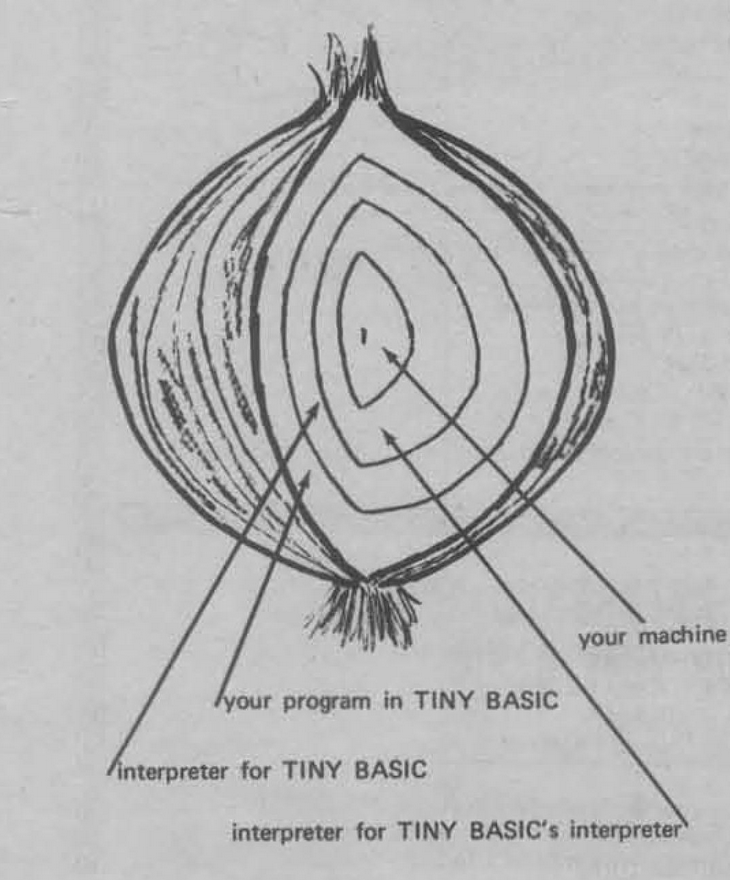
When you write a program in TINY BASIC there is an abstract machine which is necessary to execute it. If you had a compiler it would make in the machine language of your computer a program which emulates that abstract machine for your program. An interpreter implements the abstract machine for the entire language and rather than translating the program once to machine code it translates it dynamically as needed. Interpreters are programs and as such have theirs as abstract machines. One can find a better instruction set than that of any general purpose computer for writing a particular interpreter. Then one can write an interpreter to interpret the instructions of the interpreter which is interpreting the TINY BASIC program. And if your machine is microprogrammed (like PACE), the machine which is interpreting the interpreter interpreting the interpreter interpreting BASIC is in fact interpreted.
TINY BASIC GRAMMAR
The things in bold face stand for themselves. The names in lower case represent classes of things. “::=” is read “is defined as”. The asterisk denotes zero or more occurrences of the object to its immediate left. Parenthesis group objects, ∅ is the empty set. | denotes the alternative (the exclusive-or).
| line | ::= | number statement (CR) | statement (CR) |
| statement | ::= | PRINT expr-list |
| IF expression relop expression THEN statement | ||
| GOTO expression | ||
| INPUT var-list | ||
| LET var = expression | ||
| GOSUB expression | ||
| RETURN | ||
| CLEAR | ||
| LIST | ||
| RUN | ||
| END | ||
| expr-list | ::= | (string | expression) ( , (string | expression) * ) |
| var-list | ::= | var ( , var) * |
| expression | ::= | (+ | – | ∅ ) term ( (+ | – ) term) * |
| term | ::= | factor ( ( * | / ) factor ) * |
| factor | ::= | var | number | ( expression ) |
| var | ::= | A | B | C … | Y | Z |
| number | ::= | digit digit * |
| digit | ::= | 0 | 1 | 2 … | 8 | 9 |
| relop | ::= | < ( > | = | ∅ ) | > ( < | = | ∅ ) | = |
A BREAK from the console will interrupt execution of the program.
QUICK REFERENCE GUIDE FOR TINY BASIC
LINE FORMAT AND EDITING
- Lines without numbers executed immediately
- Lines with numbers appended to program
- Line numbers must be 1 to 255
- Line number alone (empty line) deletes line
- Blanks are not significant, but key words must contain no unneeded blanks
- “<-” deletes last character
- XC deletes the entire line
EXECUTION CONTROL
CLEAR delete all lines end data RUN run program
LIST list program
EXPRESSIONS
Operators
Arithmetic
+ - * /Relational
< > = >= <= <>Variables
A...Z (26 only) All arithmetic is modulo 215 (± 32762)
INPUT / OUTPUT
PRINT  X, Y, Z
PRINT  "A  STRING"
PRINT "THE  ANSWER  IS"
INPUT  X
INPUT  X, Y, Z
ASSIGNMENT STATEMENTS
LET  X=3
LET  X=  -3 + 5 * Y
CONTROL STATEMENTS
GOTO  X+10
GOTO  35
GOSUB  X+35
GOSUB 50
RETURN
IF  X>Y  THEN  GOTO  30
This multilayered, onion-like approach gains two things: the interpreter for the interpreter is smaller and simpler to write than an interpreter for all of TINY BASIC, so the resultant system is fairly portable. Secondly, since the major part of the TINY BASIC is programmed in a highly memory efficient, tailored instruction set, the interpreted TINY BASIC will be smaller than direct coding would allow. The cost is in execution speed, but there is not such a thing as a free lunch.
LINE STORAGE
The TINY BASIC program is stored, except for line numbers, just as it is entered from the console. In some BASIC interpreters, the program is translated into an intermediate form which speeds execution and saves space. In the TINY BASIC environment, the code necessary to provide the transformation would easily exceed the space saved.
When a line is read in from the console device, it is saved in a 72-byte array called LBUF (Line BUFfer). At the same time, a pointer, CP, is maintained to indicate the next available space in LBUF. Indexing is, of course, from zero.
Delete the leading blanks. If the string matches the BASIC line, advance the cursor over the matched string and execute the next IL instruction, If the match fails, continue at the IL instruction labeled lbl.
The TINY BASIC program is stored as an array called PGM in order of increasing line numbers. A pointer, PGP, indicates the first free place in the array. PGP=0 indicates an empty program; PGP must be less than the dimension of the array PGM, The PGM array must be reorganized when new lines are added, tines replaced, or lines ere deleted.
Insertion and deletion are carried on simultaneously. When a new line is to be entered, the PGM array searches for a line with a line number greater than or equal to that of the new line.Notice that lines begin at PGM (0) and at PGM (j+1) for every j such that PGM (j) = [carriage return]. If the line numbers are equal, then the length of the existing line is computed. A space equal to the length of the new line is created by moving all lines with line numbers greater than that of the line being inserted up or down as appropriate. The empty line is handled as a special case in that no insertion is made.
ERRORS AND ERROR RECOVERY
There are two places that errors can occur, if they occur in the TINY BASIC system, they must be captured and action taken to preserve the system. If the error occurs in the TINY BASIC program entered by the user, the system should report the error and allow the user to fix their problem. An error in TINY BASIC can result from a badly formed statement, an illegal action (attempt to divide by zero, for example), or the exhaustion of some resource such as memory space. In any case, the desired response is some kind of error message. We plan to provide a message of the form:
! mmm AT nnn where mmm is the error number and nnn is the line number at which it occurs. For direct statements, the form will be:
! mmm since there is no line number.
Some error indications we know we will need are:
- Syntax error
- Missing line
- Line number too large
- Too many GOSUBs
- RETURN without GOSUB
- Expression too complex
- Too many lines
- Division by zero
THE BASIC LINE EXECUTOR
The execution routine is written in the interpretive language, IL. It consists of a sequence of instructions which may call subroutines written in IL, or invoke special instructions which are really subroutines written in machine language. Two different things are going on at the same time. The routines must determine if the TINY BASIC line is a legal one and determine its form according to the grammar; secondly, it must call appropriate action routines to execute the line. Consider the TINY BASIC statement:
GOTO 100At the start of the line, the interpreter looks for BASIC key words {LET, GO. IF, RETURN, etc.) In this case, it finds GO, and then finds TO. By this time it knows that it has found a GOTO statement. It then calls the routine EXPR to obtain the destination line number of the GOTO. The expression routine calls a whole bunch of other routines, eventually leaving the number 100 (the value of the expression) in a special place, the top of the arithmetic expression stack. Since everything is legal, the XFER operator is invoked to arrange for the execution of line 100 (if it exists) as the next line to be executed.
Each TINY BASIC statement is handled similarly. Some procedural section of an IL program corresponds to tests for the statement structure and acts to execute the statement.
ENCODING
There are a number of different considerations in the TINY BASIC design which fall in this general category. The problem is to make efficient use of the bits available to store information without loosing out by requiring a too complex decoding scheme.
In a number of places we have to indicate the end of a string of characters (or else we have to provide for its length somewhere). Commonly, one uses a special character (NUL = 00H for example) to indicate the end. This costs one byte per string but is easy to check, A better way depends upon the fact that ASCII code does not use the high order bit; normally It is used for parity on transmission. We can use it to indicate the end (that is, last character) of a string. When we process the characters we must AND the character with 07FH to scrub off the flag bit.
The interpreter opcodes can be encoded into a single byte. Operations fall into two distinct classes–those which call machine language subroutines, and those which either call or transfer within the IL language itself, The diagram indicates one encoding scheme. The CALL operations have been subsumed into the IL instruction set. Addressing is shown to be relative to PC for IL operations. Given the current IL program size, this seems adequate. If it is not, the address could be used to index an array with the ML class instructions.
TINY BASIC INTERPRETIVE OPERATIONS
TST lbl,'string'Delete leading blanks.
If string matches the BASIC line, advance cursor over the matched string and execute the next IL instruction. If a match fails, execute the It instruction at the labeled lbl.
CALL lblExecute the IL subroutine starting at lbl. Save the IL address following the CALL on the control stack.
RTNReturn to the IL location specified by the top of the control stack.
DONEReport a syntax error if after deletion leading blanks the cursor is not positioned to read a carriage return.
JMP lblContinue execution of IL at the label specified.
PRSPrint characters from the BASIC text up to but not including the closing quote mark. If a (CR) is found in the program text, report an error. Move the cursor to the point following the closing quote.
PRNPrint number obtained by popping the top of the expression stack.
SPCInsert spaces to move the print head to next zone,
NLINEOutput CRLF to Printer.
NXTIf the present mode is direct (line number zero), then return to line collection. Otherwise, select the next sequential line and begin interpretation.
XFERTest value at the top of the AE stack to be within range. If not, report an error. If so, attempt to position cursor at that line. If it exists, begin interpretation there; if not report an error.
SAVPlace present line number on SBRSTK. Report overflow as error.
RSTRReplace current line number with value on SBRSTK, If stack is empty, report error,
CMPRCompare AESTK(SP), the top of the stack, with AESTK (SP – 2) as per the relation indicated by AESTK(SP – 1). Delete all from stack. If condition specified did not match, then perform NXT action.
INNUMRead a number from the terminal and push its value onto the AESTK.
FINReturn to the line collect routine.
ERRReport syntax error and return to line collect routine.
ADDReplace top two elements of AESTK by their sum.
SUBReplace top two elements of AESTK by their difference.
NEGReplace top of AESTK with its negative.
MULReplace top two elements of AESTK by their product
DIVReplace top two elements of AESTK by their quotient
STOREPlace the value at the top of the AESTK into the variable designated by the index specified by the value immediately below it. Delete both from the stack.
TSTV lblTest for variable (i.e. letter) if present. Place its index value onto the AESTK and continue execution at next suggested location. Otherwise, continue at lbl.
TSTN lblTest for number. If present, place Its value onto the AESTK and continue execution at next suggested location. Otherwise, continue at lbl.
INDReplace top of stack by variable value if indexes.
LSTList the contents of the program area.
INITPerforms global initialization
Clears program area, empties GOSUB stack, etc.
GETLINEInput a line to LBUF.
TSTL lblAfter editing leading blanks, look for a line number. Report error if invalid; transfer to lbl if not present.
INSRTInsert line after deleting any line with same line number.
XINITPerform initialization for each stated execution.
Empties AEXP stack.
A STATEMENT EXECUTOR WRITTEN IN IL
This program in IL will execute a TINY BASIC statement. The operators TST, TSTV, TSTN, and PRS all use a cursor to find characteristics of the TINY BASIC line. Other operations (NXT, XPER) move the cursor so it points to another TINY BASIC line.
THE IL CONTROL SECTION
START:    INIT                     ; INITIALIZE
          NLINE                    ; WRITE  CR/LF
CO:       GETLINE                  ; WRITE PROMPT & GET A  LINE
          TSTL      XEC            ; TEST  FOR  LINE  NUMBER
          INSRT                    ; INSERT IT (MAY BE DELETE)
          JMP       CO
STMT:     XINIT                    ; INITIALIZE FOR EXECUTION
STATEMENT EXECUTOR
STMT:     TST       S1,'LET'       ; IS STATEMENT A LET?
          TSTV      S16            ; YES. PLACE VAR ADDRESS ON AESTK.
          CALL      EXPR           ; PLACE EXPR VALUE ON AESTK.
          DONE                     ; REPORT ERROR IF (CR) NOT NEXT.
          STORE                    ; STORE RESULT.
          NXT                      ; AND SEQUENCE TO NEXT.
S1:       TST       S3,'GO'        ; GOTO OR GOSUB?
          TST       S2,'TO'        ; YES ...TO OR ...SUB.
          CALL      EXPR           ; GET LABEL.
          DONE                     ; ERROR IF (CR) NOT NEXT.
          XPER                     ; SET UP AND JUMP.
S2:       TST      S14,'SUB'       ; ERROR IF NO MATCH.
          CALL EXPR                ; GET DESTINATION.
          DONE                     ; ERROR IF (CR) NOT NEXT.
          SAV                      ; SAVE RETURN LINE.
          XFER                     ; AND JUMP.
S3:       TST       S8,'PRINT'     ; PRINT.
S4:       TST       S7,'"'         ; TEST FOR QUOTE.
          PRS                      ; PRINT STRING.
S5:       TST       S6,','         ; IS THERE MORE?
          SPC                      ; SPACE TO NEXT ZONE.
          JMP       S4             ; YES. JUMP BACK.
S6:       DONE                     ; NO, ERROR IF NO (CR).
          NLINE
          NXT
S7:       CALL      EXPR           ; GET EXPR VALUE.
          PRN                      ; PRINT IT.
          JMP       S5             ; IS THERE MORE?
S8:       TST       S9,'IF'        ; IF STATEMENT.
          CALL      EXPR           ; GET EXPRESSION.
          CALL      RELOP          ; DETERMINE OPR AND PUT ON STK.
          CALL      EXPR           ; GET EXPRESSION.
          CMPR                     ; PERFORM COMPARISON-PERFORMS NEXT IF FALSE.
          JMP       STMT           ; GET NEXT STATEMENT.
S9:       TST       S12,'INPUT'    ; INPUT STATEMENT.
S10:      CALL      VAR            ; GET VAR ADDRESS.
          INNUM                    ; MOVE NUMBER FROM TTY TO AESTK.
          STORE                    ; STORE IT.
          TST       S11,','        ; IS THERE MORE?
          JMP       S10            ; YES.
S11:      DONE                     ; MUST BE (CR).
          NXT                      ; SEQUENCE TO NEXT.
S12:      TST       S13,'RETURN'   ; RETURN STATEMENT.
          DONE                     ; MUST BE (CR).
          RSTR                     ; RESTORE LINE NUMBER OF CALL.
          NXT                      ; SEQUENCE TO NEXT STATEMENT.
S13:      TST       S14,'END'
          FIN
S14:      TST       S15,'LIST'     ; LIST COMMAND.
          DONE
          LST
          NXT
S15:      TST       S16,'RUN'      ; RUN COMMAND.
          DONE
          NXT
S16:      TST       S17,'CLEAR'    ; CLEAR COMMAND.
          DONE
          JMP       START

S17:      ERR                      ; SYNTAX  ERROR.

EXPR:     TST       E0,'-'         ; TEST FOR UNARY -.
          CALL      TERM           ; GET VALUE.
          NEG                      ; NEGATE IT.
          JMP       E1             ; LOOK FOR MORE.
E0:       TST       E1,'+'         ; TEST FOR UNARY +.
          CALL      TERM           ; LEADING TERM.
E1:       TST       E2,'+'
          CALL      TERM           ; SUM TERM.
          ADD
          JMP       E1
E2:       TST       E3,'-'         ; ANY MORE?
          CALL      TERM           ; DIFFERENCE TERM.
          SUB
          JMP       E3
E3: T2:   RTN                      ; ANY MORE?
TERM:     CALL      FACT
T0:       TST       T1,'*'
          CALL      FACT           ; PRODUCT FACTOR
          MPY
          JMP       T0
T1:       TST       T2,'/'         ; ANY MORE?
          CALL      FACT           ; QUOTIENT FACTOR.
          DIV
          JMP       T0

FACT:     TSTV      F0             ; VARIABLE.
          IND                      ; YES, GET THE VALUE.
          RTN
F0:       TSTN      F1             ; NUMBER, GET ITS VALUE.
          RTN
F1:       TST       F2,'('         ; PARENTHESIZED EXPR.
          CALL      EXPR
          TST       F2,')'         ; MATCHING PARENTHESIS.
          RTN
F2:       ERR                      ; ERROR.

RELOP:    TST       R0,'='
          LIT       0              ; =
          RTN
R0:       TST       R4,'<'
          TST       R1,'='
          LIT       2              ; <=
          RTN
R1:       TST       R3,'>'
          LIT       3              ; <>
          RTN
R3:       LIT       1              ; <
          RTN
R4:       TST       S17,'>'
          TST       R5,'='
          LIT       5              ; >=
          RTN
R5:       TST       R6,'<'
          LIT       3              ; <>
R6:       LIT       4              ; >
          RTN
WE’RE NOT DONE YET
This isn’t everything one needs to make a TINY BASIC. It’s just a beginning and nothing is tested yet. We’ll have more next issue. In the meantime, we welcome your comments, ideas, letters, and corrections.
Leave a Reply