A Text Editing And Storage Program
Paul Bishop
Compute! Magazine, April 1983, page 50.
This mini word processor for the VIC lets you cuter, edit, and save text to tape. It works with the VIC 1515 printer and 3K memory expansion.
If you are at all like me, the minute you saw the VIC-20 sitting there on the showroom table flashing its upper-lowercase mode, you smiled to yourself and said what a wonderful text storage and manipulation device it would make. Wonderful in this context means inexpensive, and Commodore promised us no less in its literature.
This program is a miniature word processor. It will allow the user to input text, edit it (with certain limitations), and save it to tape. The text may be printed on any line length specified, though it will not right justify. The program uses a word wrapping scheme to minimize the VIC’s limited display size and is meant to be used with the VIC 1515 printer and a 3K memory expansion.
Entering Text
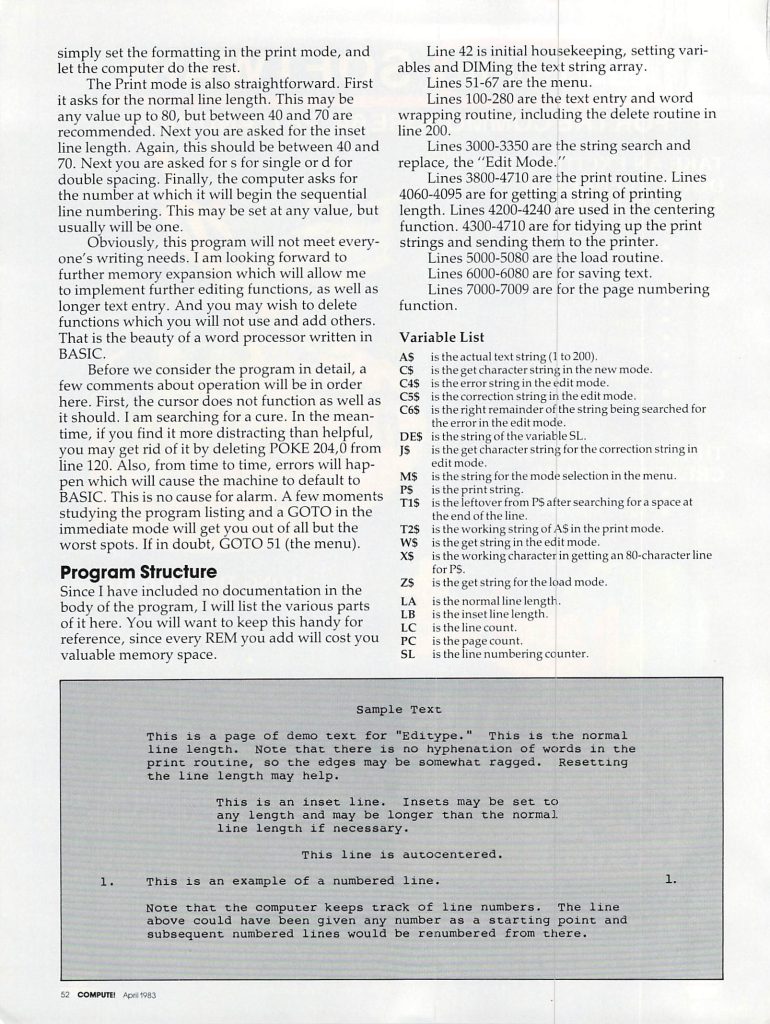
The program is menu driven, and we will discuss the options in detail. New mode is used for entering text. It is also the mode in which the for matting features are selected. Centering is done by pressing the up-arrow (next to the restore key) at the beginning of the line that is to be centered. Remember to use the carriage return at the end of the line, and note that the line may not exceed the line length you intend to print.
The second function is an inset line length. This is selected by pressing the first bracket (shifted colon) at the start of the text to be inset. All text before the next return character will be printed on the alternate line length, which will be specified during printing. Line numbering is something that I use frequently. It is selected with the second bracket, and the line will be printed with a number (numbered sequentially by the computer) before and after the line. Examples of all the formatting options are represented in the demo text.
Backspacing in the New mode may only be done with the DEL key, and may only continue to the first character of the line on which the cursor rests. Any further DELeting will result in an Illegal Quantity error. If a boo-boo is in an earlier line, it must be corrected in the edit mode. All keys re peat, and the pound symbol (next to CLR HOME) is used to return to the menu. Once the menu is chosen, no further text may be entered in the New mode. (This is something the user could change.)
A final note: text entry becomes progressively slower as memory fills, and subsequent printing is also adversely affected by large quantities (relatively speaking) of text. So, although the low memory warning should keep you from over-typing the machine’s capacity, it is best to save the text and then continue when the word-wrap starts to slow down.
Text entered in the New mode can be reviewed and modified in the Edit mode. The mode has three options: Forward, Correct, and Return to Main Menu. The Forward option scrolls through the text one VIC screen line at a time. To make changes in entered text, use the Correct option. You will be given the prompt “error:”, at which point you enter the characters you wish to change as they appear in the text. End your entry with the up-arrow (t) key, not the RETURN key. The next prompt is “correction:”. Enter the text as you wish it to appear in the corrected version. Again follow your input with the up-arrow key rather than RETURN. The computer will then search the text for the “error” and replace it with the “correction.” If the search characters are not found in the text, the program will provide an error message.
Saving And Printing
The save mode is straightforward in operation: simply press the S key and RETURN and the text will be stored under the title you entered in the New mode. Load is just like it. If you include a file name, the cassette drive will search for that file; otherwise it will load the first file it comes to. The Load and Print mode is for files too long to be contained in memory and is fairly automatic. You simply set the formatting in the print mode, and let the computer do the rest.
The Print mode is also straightforward. First it asks for the normal line length. This may be any value up to 80, but between 40 and 70 are recommended. Next you are asked for the inset line length. Again, this should be between 40 and 70. Next you are asked for s for single or d for double spacing. Finally, the computer asks for the number at which it will begin the sequential line numbering. This may be set at any value, but usually will be one.
Obviously, this program will not meet every one’s writing needs. I am looking forward to further memory expansion which will allow me to implement further editing functions, as well as longer text entry. And you may wish to delete functions which you will not use and add others. That is the beauty of a word processor written in BASIC.
Before we consider the program in detail, a few comments about operation will be in order here. First, the cursor does not function as well as it should. I am searching for a cure. In the mean time, if you find it more distracting than helpful, you may get rid of it by deleting POKE 204,0 from line 120. Also, from time to time, errors will hap pen which will cause the machine to default to BASIC. This is no cause for alarm. A few moments studying the program listing and a GOTO in the immediate mode will get you out of all but the worst spots. If in doubt, GOTO 51 (the menu).
Program Structure
Since I have included no documentation in the body of the program, I will list the various parts of it here. You will want to keep this handy for reference, since every REM you add will cost you valuable memory space.
Line 42 is initial housekeeping, setting variables and DIMing the text string array.
Lines 51-67 are the menu.
Lines 100-280 are the text entry and word wrapping routine, including the delete routine in line 200.
Lines 3000-3350 are the string search and replace, the “Edit Mode”.
Lines 3800-4710 are the print routine. Lines 4060-4095 are for getting a string of printing length. Lines 4200-4240 are used in the centering function. 4300-4710 are for tidying up the print strings and sending them to the printer.
Lines 5000-5080 are the load routine.
Lines 6000-6080 are for saving text.
Lines 7000-7009 are for the page numbering function.
Variable List
A$ is the actual text string (1 to 200).
C$ is the get character string in the new mode.
C4$ is the error string in the edit mode.
C5$ is the correction string in the edit mode.
C6$ is the right remainder of the string being searched for the error in the edit mode.
DE$ is the string of the variable SL.
J$ is the get character string for the correction string in edit mode.
M$ is the string for the mode selection in the menu.
P$ is the print string.
T1$ is the leftover from P$ after searching for a space at the end of the line.
W$ is the get string in the edit mode.
T2$ is the working string of AS in the print mode.
X$ is the working character in getting an 80-character line for PS.
Z$ is the get string for the load mode.
LA is the normal line length.
LB is the inset line length.
LC is the line count.
PC is the page count.
SL is the line numbering counter.
Code Listing
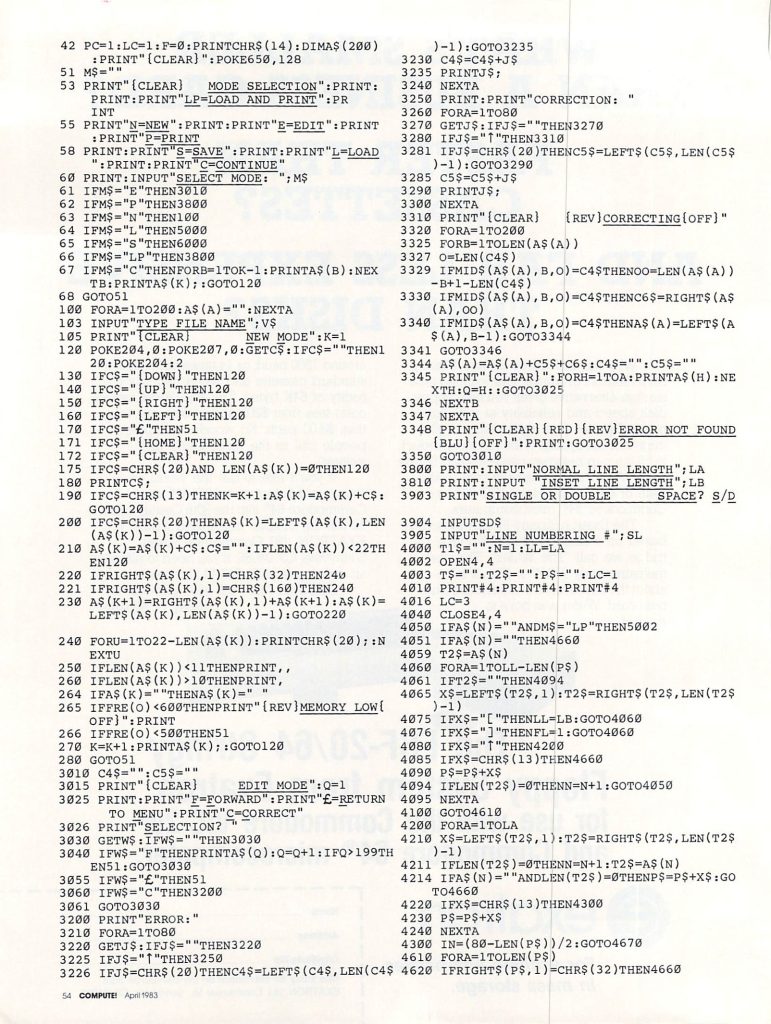
42 PC=1:LC=1:F=0:PRINT CHR$(14): DIM A$(200):PRINT "{CLEAR}":POKE 650,128
51 M$=""
53 PRINT "{CLEAR}   MODE SELECTION":PRINT:PRINT:PRINT"LP=LOAD AND PRINT":PRINT
55 PRINT "N=NEW":PRINT:PRINT"E=EDIT":PRINT:PRINT"P=PRINT"
58 PRINT:PRINT "S=SAVE":PRINT:PRINT "L=LOAD":PRINT:PRINT "C=CONTINUE"
60 PRINT:INPUT "SELECT MODE: "; M$
61 IF M$="E" THEN 3010
62 IF M$="P" THEN 3800
63 IF M$="N" THEN 100
64 IF M$="L" THEN 5000
65 IF M$="S" THEN 6000
66 IF M$="LP" THEN 3800
67 IF M$="C" THEN FOR B=1 TO K-1:PRINT A$(B):NEXT B PRINT A$(K);:GOTO 120
68 GOTO 51
100 FOR A=1 TO 200:A$(A)="":NEXT A
103 INPUT "TYPE FILE NAME";V$
105 PRINT "{CLEAR}       NEW MODE":K=1
120 POKE 204,0:POKE 207,0:GET C$:IF C$="" THEN 120:POKE 204:2
130 IF C$="{DOWN}" THEN 120
140 IF C$="{UP}" THEN 120
150 IF C$="{RIGHT}"  THEN 120
160 IF C$="{LEFT}"  THEN 120
170 IF C$="@" THEN 51
171 IF C$="{HOME}" THEN 120
172 IF C$="{CLEAR}" THEN 120
175 IF C$=CHR$(20) AND LEN(A$(K))=0 THEN 120
180 PRINT C$;
190 IF C$=CHR$(13) THEN K=K+1:A$(K)=A$(K)+C$:GOTO 120
200 IF C$=CHR$(20) THEN A$(K)=LEFT$(A$(K),LEN(A$(K))-1):GOTO 120
210 A$(K)=A$(K)+C$:C$="":IF LEN(A$(K))<22 THEN 120
220 IF RIGHT$(A$(K),1)=CHR$(32) THEN 240
221 IF RIGHT$(A$(K),1)=CHR$(160) THEN 240
230 A$(K+1)=RIGHT$(A$(K),1)+A$(K+1):A$(K)=LEFT$(A$(K),LEN(A$(K))-1):GOTO 220
240 FOR U=1 TO 22-LEN(A$(K)):PRINT CHR$(20);:NEXT U
250 IF LEN(A$(K))<11 THEN PRINT,,
260 IF LEN(A$(K))>10 THEN PRINT,
264 IF A$(K)="" THEN A$(K)=" "
265 IF FRE(O)<600 THEN PRINT "{REV}MEMORY LOW{OFF}":PRINT
266 IF FRE(O)<500 THEN 51
270 K=K=1:PRINT A$(K);:GOTO 120
280 GOTO 51
3010 C4$="":C5$=""
3015 PRINT "{CLEAR}     EDIT MODE":Q=1
3025 PRINT:PRINT "F=FORWARD":PRINT "@=RETURN TO MENU":PRINT "C=CORRECT"
3016 PRINT "SELECTION? "
3030 GET W$:IF W$="" THEN 3030
3040 IF W$="F" THEN PRINT A$(Q):Q=Q+1:IF Q>199 THEN 51:GOTO 3030
3055 IF W$="@" THEN 51
3066 IF W$="C" THEN 3200
3061 GOTO 3030
3200 PRINT "ERROR:"
3210 FOR A=1 TO 80
3220     GET J$:IF J$="" THEN 3220
3225     IF J$="{UP}" THEN 3250
3226     IF J$=CHR$(20) THEN C4$=LEFT$(C4$,LEN(C4$)-1):GOTO 3235
3230     C4$=C$+J$
3235     PRINT J$
3240 NEXT A
3250 PRINT:PRINT "CORRECTION: "
3260 FOR A=1 TO 80
3270     GET J$:IF J$="" THEN 3270
3280     IF J$="{UP}" THEN 3310
3281     IF J$=CHR$(20) THEN C5$=LEFT$(C5$,LEN(C5$)-1):GOTO 3290
3285     C5$=C5$+J$
3290     PRINT J$;
3300 NEXT A
3310 PRINT "{CLEAR}   {REV}CORRECTING{OFF}"
3320 FOR A=1 TO 200
3325     FOR B=1 TO LEN (A$(A))
3327         O=LEN(C4$)
3329         IF MID$(A$(A),B,O)=C4$ THEN OO=LEN(A$(A))-B+1-LEN(C4$)
3330         IF MID$(A$(A),B,O)=C4$ THEN C6$=RIGHT$(A$(A),OO)
3340         IF MID$(A$(A),B,O)=C4$ THEN A$(A)=LEFT$(A$(A),B-1):GOTO 3344
3341         GOTO 3346
3344         A$(A)=A$(A)+C5$+C6$:C4$="":C5$=""
3345         PRINT "{CLEAR}":FOR H=1 TO A:PRINT A$(H):NEXT H:Q=H::GOTO 3025
3346     NEXT B
3347 NEXT A
3348 PRINT "{CLEAR}{RED}{REV}ERROR NOT FOUND{BLU}{OFF}":PRINT:GOTO 3025
3350 GOTO 3010
3800 PRINT:INPUT "NORMAL LINE LENGTH"; LA
3810 PRINT:INPUT "INSET LINE LENGTH"; LB
3903 PRINT "SINGLE OR DOUBLE      SPACE? S/D"
3904 INPUT SD$
3905 INPUT "LINE NUMBERING #"; SL
4000 T1$="":N=1:LL=LA
4002 OPEN 4,4
4003 T$="":T2$="":P$="":LC=1
4010 PRINT #4:PRINT #4:PRINT #4
4016 LC=3
4040 CLOSE 4,4
4050 IF A$(N)="" AND M$="LP" THEN 5002
4051 IF A$(N)="" THEN 4600
4059 T2$=A$(N)
4060 FOR A=1 TO LL-LEN(P$)
4061     T2$="" THEN 4094
4065     X$=LEFT$(T2$,1):T2$=RIGHT$(T2$,LEN(T2$)-1)
4075     IF X$="[" THEN LL=LB:GOTO 4060
4076     IF X$="]" THEN FL=1:GOTO 4060
4080     IF X$="{UP}" THEN 4200
4085     IF X$=CHR$(13) THEN 4660
4090     P$=P$+X$
4094     IF LEN(T2$)=0 THEN N=N+1:GOTO 4050
4095 NEXT A
4100 GOTO 4610
4200 FOR A=1 TO LA
4210     X$=LEFT$(T2$,1):T2$=RIGHT$(T2$,LEN(T2$)-1)
4211     IF LEN(T2$)=0 THEN N=N+1:T2$=A$(N)
4214     IF A$(N)="" AND LEN (T2$)=0 THEN P$=X$:GOTO 4660
4220     IF X$=CHR$(13) THEN 4300
4230     P$=P$+X$
4240 NEXT A
4300 IN=(80-LEN(P$))/2:GOTO 4670
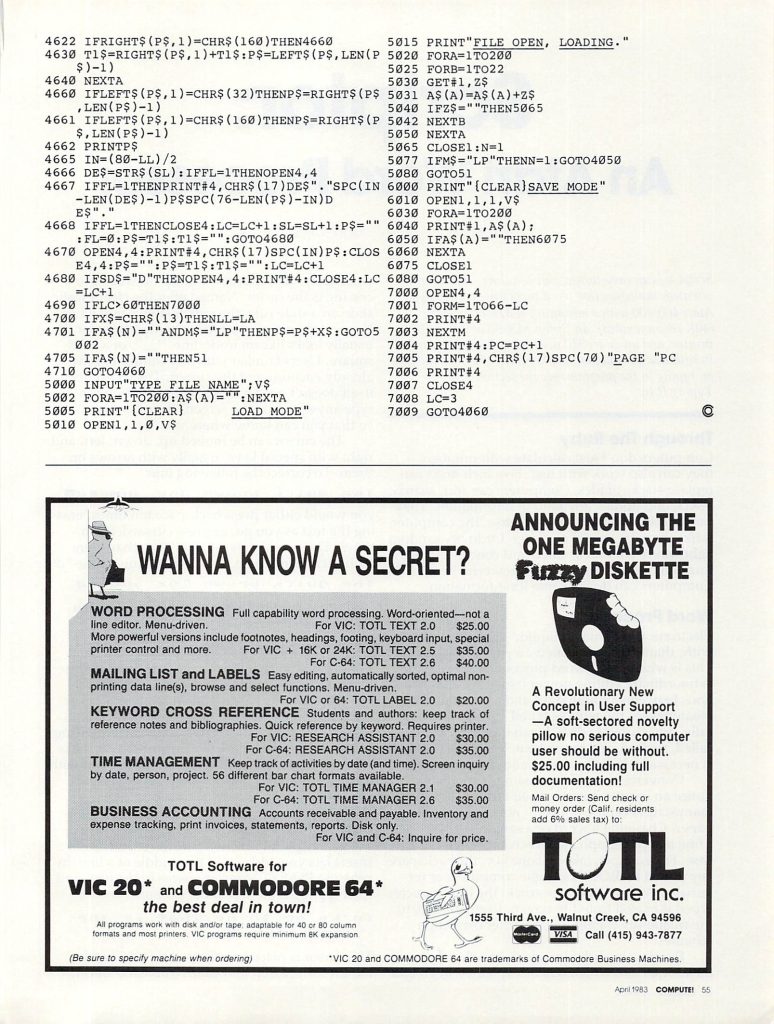
4620 IF RIGHT$(P$,1)=CHR$(32) THEN 4660
4622 IF RIGHT$(P$,1)=CHR$(160) THEN 4660
4630 T1$=RIGHT$(P$,1)+T1$:P$=LEFT$(P$,LEN(P$)-1)
4640 NEXT A
4660 IF LEFT$(P$,1)=CHR$(32) THEN P$=RIGHT(P$,LEN(P$)-1)
4661 IF LEFT$(P$,1)=CHR$(160) THEN P$=RIGHT$(P$,LEN(P$)-1)
4662 PRINT P$
4665 IN=(80-LL)/2
4666 DE$=STR$(SL):IF FL=1 THEN OPEN 4,4
4667 IF FL=1 THEN PRINT #4,CHR$(17)DE$"."SPC(IN-LEN(DE$)-1)P$SPC(75-LEN(P$)-IN)DE$"."
4668 IF FL=1 THEN CLOSE 4:LC=LC+1:SL=SL+1:P$="":FL=0:P$=T1$:T1$="":GOTO 4680
4670 OPEN 4,4:PRINT #4,CHR$(17)SPC(IN)P$:CLOSE 4,4:P$="":P$=T1$:T1$="":LC=LC+1
4680 IF SD$="D" THEN OPEN 4,4:PRINT #4:CLOSE 4:LC=LC+1
4690 IF LC>60 THEN 7000
4700 IF X$=CHR$(13) THEN LL=LA
4701 IF A$(N)="" AND M$="LP" THEN P$=P$+X$:GOTO 5002
4705 IF A$(N) "" THEN 51
4710 GOTO 4060
5000 INPUT "TYPE FILE NAME"; V$
5002 FOR A=1 TO 200:A$(A)="":NEXT A
5005 PRINT "{CLEAR}      LOAD MODE"
5010 OPEN 1,1,0,V$
5015 PRINT "FILE OPEN, LOADING."
5020 FOR A=1 TO 200
5025     FOR B=1 TO 22
5030         GET #1,Z$
5031         A$(A)=A$(A)+Z$
5040         IF Z$="" THEN 5065
5042     NEXT B
5050 NEXT A
5065 CLOSE 1:N=1
5070 IF M$="LP" THEN N=1:GOTO 4050
5080 GOTO 51
6000 PRINT "{CLEAR}SAVE MODE"
6010 OPEN 1,1,1,V$
6030 FOR A=1 TO 200
6040     PRINT #1,A$(A);
6050     IF A$(A)="" THEN 6075
6060 NEXT A
6075 CLOSE 1
6080 GOTO 51
7000 OPEN 4,4
7001 FOR M=1 TO 66-LC
7002     PRINT #4
7003 NEXT M
7004 PRINT #4:PC=PC+1
7005 PRINT #4,CHR$(17)SPC(70)"PAGE "PC
7006 PRINT #4
7007 CLOSE 4
7008 LC=3
7009 GOTO 4060
Leave a Reply